Hi,
Following this thread (where I was trying to gather informations on metaballs) I decided to use the toxiclibs library in order to draw one myself.
Here is the kind of result I would like to achieve:

from Zach Lieberman (see full motion here)
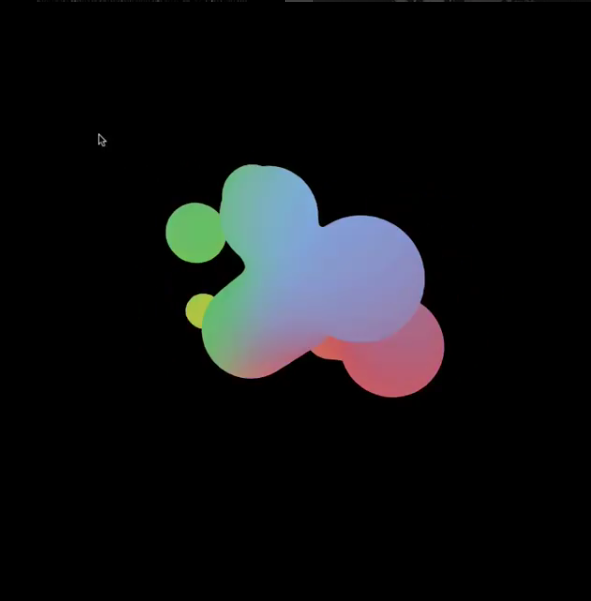
from Wenzy Yang (see full motion here)
Here's what I could do so far:

The problems I'm facing:
- I can't figure out how to give each metaballs a specific color (with the toxiclib library).
- I don't know how to apply linear interpolations to the mesh vertices (with the toxiclib library) in order to smooth the contours.
- My sketch is running very slow (8 fps for the GIF above) when I draw each face individually with a specific color (coordinates-based): How can I improve the script to make it faster ?
What I would like to know :
How did Zach Lieberman colored his metaballs ? (Do you think he assigned a single color per ball or that he colored them according to their coordinates ?). Ideally I would like to reproduce this effect with Processing and toxiclibs.
How did Wenzy Yang draw such smooth contours without any lag ? With toxiclibs, drawing an equally dense
VolumetricSpaceArraywould be too much computer intensive. (Hence my question about linear interpolations).
For example, with grid and dim set respectively at 70 and 700 my sketch is running at 9 fps and yet, see how pixelized the metaballs still look:

full code:
    add_library('toxiclibs_p5')
    add_library('toxiclibscore')
    add_library('volumeutils')
    add_library('peasycam')
    from toxi.processing import ToxiclibsSupport

    mesh = TriangleMesh("mesh")
    iso, grid, dim = .3, 70, 700
    scl = Vec3D(dim, dim, dim)
    volume = VolumetricSpaceArray(scl, grid, grid, grid)
    surface, brush = ArrayIsoSurface(volume), RoundBrush(volume, scl.x() / 2)

    def setup():
        global points, gfx, a, cam
        size(720, 720, P3D)
        smooth(8)

        cam, gfx, a = PeasyCam(this, 700), ToxiclibsSupport(this), Attractor(0, 0, 0, 1, 100)
        points = []
        [points.append(Point()) for e in range(10)]
        noStroke()
        beginShape(TRIANGLES)


    def draw():
        background(0)
        print frameRate

        volume.clear()
        for i, p in enumerate(points):
            force = a.attract(p)
            p.applyForce(force)
            p.update()
            p.display()
        volume.closeSides()

        surface.reset()
        surface.computeSurfaceMesh(mesh,iso)
        mesh.computeVertexNormals()
        gfx.mesh(mesh, True)

        num = mesh.getNumFaces()
        for i in range(num):
            f = mesh.faces[i]
            fill(230 + f.a.x()/2, 230 +f.a.y()/2 , 230 - f.a.z()/2, 255 - f.a.z()/2)
            vertex(f.a.x(), f.a.y(), f.a.z())
            vertex(f.b.x(), f.b.y(), f.b.z())
            vertex(f.c.x(), f.c.y(), f.c.z())
        endShape()

        cam.rotateY(.02)


    class Point(object):
        def __init__(self):
            self.r = random(10, 220)
            self.pos = PVector(random(-100,100), random(-100,100), random(-100, 100))
            self.vel = PVector(0, 0, 0)
            self.acceleration = PVector(0, 0, 0)
            self.mass = 1 + (self.r * .01)
            self.color = colors[int(random(len(colors)))]

        def display(self):
            v = Vec3D(self.pos.x, self.pos.y, self.pos.z)
            vv = v.interpolateToSelf(v, .5)
            brush.setSize(self.r)
            brush.drawAtAbsolutePos(v, 1)

        def applyForce(self, f):
            f = f / self.mass
            self.acceleration += f *.5

        def update(self):
            self.vel += self.acceleration
            self.pos += self.vel
            self.acceleration *= 0
            self.vel.limit(10)

    class Attractor():
        def __init__(self, x, y, z, m, g):
            self.location = PVector(x, y, z)
            self.mass = m
            self.G = g

        def attract(self, m):
            force = PVector.sub(self.location, m.pos)
            d = force.mag()
            d = constrain(d, 5, 25)
            force.normalize()
            strength = (self.G * self.mass * m.mass) / (d * d)

            if keyPressed and m.mass < 1.5:
                    force.mult(-strength*2)

        return force