I want to reset to the initial processing at the end of this video, however , there is no way to know when the video ends How should I want the end of the video to initialize all variables and to turn to its initial state ?
↧
How to know that video play is over
↧
carnivore unable to detect the devices
Hi, I have been trying to use the carinover library which I got from here - Library . Can anyone help me to fix this?
Some relevant information - I am using ASUS X450J windows 10 64bit. Running the code on processing 2.2.1 64bit. I have already installed the wireshark incase that is relevant.
Code -
    import org.rsg.carnivore.*;
    import org.rsg.lib.Log;

    CarnivoreP5 c;

    void setup() {
      size(600, 400);
      background(255);
      Log.setDebug(true); // Uncomment for verbose mode
      c = new CarnivoreP5(this);
    }

    void draw() {
    }

    // Called each time a new packet arrives
    void packetEvent(CarnivorePacket p) {
      println("(" + p.strTransportProtocol + " packet) " +
        p.senderSocket() + " > " + p.receiverSocket());
      //println("Payload: " + p.ascii());
      //println("---------------------------\n");
    }
Error -

↧
↧
Set a G4P TextField to not-editable
Hello,
I have a very short question: Is it possible to set a G4P TextField to not-editable?
Regards, Daantje
↧
How to import javax.media.opengl in Processing 3.0 ?
Hey!
I'm trying to run the example of MSAFluid "MSAFluidDemo" in Processing 3 and give me the error:
The package "javax.media.opengl" does not exist. You might be missing a library.
The same example works well in Processing 2.2.1 in the same computer:
MacBook Pro OS X 10.11.6
↧
Which video codec should I use, I need video to play at various speeds, backward and forward?
.. and I have red that h264 is not good for playing backward. I am exporting material from Premiere Pro CS6, my source material is full HD, 1920x1080 59.97fps. mov. Please help.
↧
↧
3D mesh or surface from point cloud
Hi, I'm trying to generate a surface from a point cloud in Processing that I generate using the point() function, how can I do that? Is there a processing library to do this?
↧
Emulate rotate.
Hello. I need to use the rotate of the Peasycam and/or Punktiert. Only that instead of the real mouse drag, I need to map the hand gestures read by a kinect. Ie, I move my hand, the kinect reads the X,Y position and the object in the screen rotates accordingly as I drag the mouse in Peasycam and Punktiert. Does anyone have any clue? Thanks in advance.
↧
Framecount*i
Can someone explain this framecount*i,and how it is used in the sketch.Because when i put out i,from the equation the vertices dont move independently.Thanks in advance
import peasy.*;
import saito.objloader.*;

OBJModel model ;
OBJModel tmpmodel ;

PeasyCam cam;
float easing = 0.005;

int VertCount;
PVector[] Verts;

void setup()
{
  size(800, 600, P3D);
  frameRate(30);
  noStroke();

  model = new OBJModel(this, "Model2.obj", "absolute", TRIANGLES);
  model.enableDebug();
  model.scale(100);
  model.translateToCenter();

  tmpmodel = new OBJModel(this, "Model2.obj", "absolute", TRIANGLES);
  tmpmodel.enableDebug();
  tmpmodel.scale(100);
  tmpmodel.translateToCenter();

  cam = new PeasyCam(this, width/2, height/2, 0, 500);
}

void draw()
{
  background(129);
  lights();

  int VertCount = model.getVertexCount ();
  PVector[] Verts = new PVector[VertCount];

  //cam.rotateY(0.05);
  cam.setMouseControlled(true);

  //println(frameCount);
  pushMatrix();
  translate(width/2, height/2, 0);

  for (int i = 0; i < VertCount; i++) {
    //PVector orgv = model.getVertex(i);

    Verts[i]= model.getVertex(i);

    //PVector tmpv = new PVector();
    if (frameCount> 100) {

      float randX = random(-0.05, 0.05);
      float randY = random(0, 0.05);
      float randZ = random(0, 0.05);

      ////HERE

      float norX = abs(cos((frameCount+i))) * randX;
      float norY = abs(cos((frameCount+i)) * randY);
      float norZ = abs(cos((frameCount+i)) * randZ);

      Verts[i].x+=Verts[i].x*norX;
      Verts[i].y+=Verts[i].y*norY;
      Verts[i].z+=Verts[i].z*norZ;

      if (Verts[i].x > width/2|| Verts[i].x < -width/2) {
        Verts[i].x+=Verts[i].x*-0.05;
      }
      if (Verts[i].y > height/2|| Verts[i].y < -height/2) {
        Verts[i].y+=Verts[i].y*-0.05;
      }

      if (Verts[i].z < -600/2 || Verts[i].z > 600/2) {  //note that Zaxis goes 'into' the screen
        Verts[i].z+=Verts[i].z*-0.05;
      }
    }

    PVector locas = new PVector(Verts[i].x, Verts[i].y, Verts[i].z);
    tmpmodel.setVertex(i, locas.x, locas.y, locas.z);
  }

  noStroke();
  tmpmodel.draw();
  popMatrix();

  translate(width/2, height/2, 0);
  noFill();
  stroke(255);
  box(width, height, 600);
}
↧
Has anyone successfully exported a Processing app using Simple-OpenNI on Mac OS X?
Has anyone been able to successfully export, then run, a Processing app using Simple-OpenNI on Mac OS X? I've tried essentially every trick and suggested fix that my Google search skills could find. I've tried adding Simple-OpenNI through the Processing GUI itself (Import Library) as well as downloading the library straight from the site and dropping it in. So it doesn't seem like the installation is the problem. My sketches all run fine, until I try to export them, then run independently. I get the infamous error:
Can't load SimpleOpenNI library (libSimpleOpenNI.jnilib) : java.lang.UnsatisfiedLinkError: Can't load library: /SimpleOpenNI/library/libSimpleOpenNI.jnilib Verify if you installed SimpleOpenNI correctly. http://code.google.com/p/simple-openni/wiki/Installation Exception in thread "Animation Thread" java.lang.RuntimeException: java.lang.UnsatisfiedLinkError: SimpleOpenNI.SimpleOpenNIJNI.swig_module_init()V [...]
As you can see in the screenshot below, the libSimpleOpenNI.jnilib seems to be present in /Contents/Java but I don't know why the Processing sketch is looking in /SimpleOpenNI/library/libSimpleOpenNI.jnilib instead of looking in its own directory structure (after being exported).
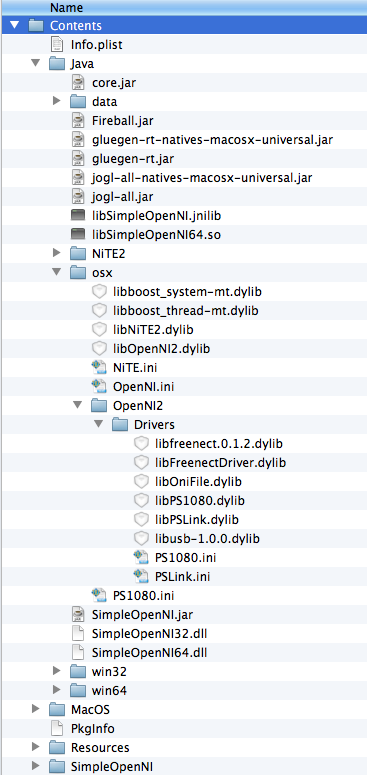
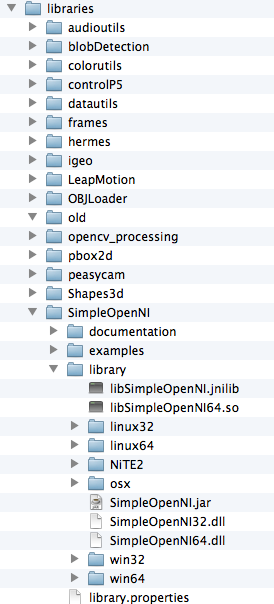
ie: The exported Processing sketch appears to be looking here (shown below), which is the location of the Simple-OpenNI libraries when they aren't being used in an exported sketch. Even though I have the library installed, it doesn't find it there either.
My specs/setup: OS X 10.8.5, Processing 2.1 (64-bit), java version "1.6.0_65", Java(TM) SE Runtime Environment (build 1.6.0_65-b14-462-11M4609), Java HotSpot(TM) 64-Bit Server VM (build 20.65-b04-462, mixed mode)
Any help is much appreciated!
↧
↧
Compiling and running an application using SimpleOpenNI library fails to load, MacOSx
I have a mac osx 10.8 and I am using SimpleOpenNI library that is giving trouble when compiling an application. When just running the processing sketch, it runs no problem. But it won't work with a compiled app. How can I run a compiled application for a Mac using the SimpleOpenNI library???
This is similar to this forum but the solution presented here is not working for my problem on a mac : https://code.google.com/p/simple-openni/issues/detail?id=73
What steps will reproduce the problem?
- Compile application with proccessing.
- run application
What is the expected output? What do you see instead? Application fails to load openni libs with error:
Exception in thread "Animation Thread" java.lang.UnsatisfiedLinkError: SimpleOpenNI.SimpleOp
        at SimpleOpenNI.SimpleOpenNiJNI.swig_module_init(Native Method)
        at SimpleOpenNI.SimpleOpenNIJNI.(SimpleOpenNIJNI.java:290)
        at SimpleOpenNI.ContextWrapper.(ContextWrapper.java:54)
        at SimpleOpenNI.SimpleOpenNI.(SimpleOpenNi.java:256)
        at LanScapesLerp.setup(LanScapesLerp.java:126)
        at processing.core.PApplet.run(PApplet.java:1530)
        at processing.core.PApplet.handleDraw(PApplet.java:1608)
        at java.lang.Thread.run(Thread.java:680)
↧
Most efficient way to simply display video?
I exported the Loop example I found in the examples of the Video library, and that ran quite smoothly on my old computer. However, I need the video to be fullscreen, so I increased the size of the sketch - the performance then dropped to about 3FPS.
I thought it might be because of the interpolation that's happening behind the scenes, so I converted the video to have the same resolution as the sketch (as was the case with the original example), and that runs smoother, but still stutters significantly.
I'm therefore wondering what's the best way to simply display a video, without any effects, any tinting, whatsoever? Is there something I'm forgetting, or does displaying a video in large scale that resource intensive without any remedy? Thanks!
↧
VHS Tape Distortion
I've been feeling really inspired by videos like this:

Most of the elements in the video seem very straightforward to make; a bunch of lines / rectangles. The color distortion is the challenging part. Are there any algorithms or techniques to get this effect?
↧
Image generating code hangs up
Hi all, i have the following code which seems to me alright:
import processing.pdf.*;
import processing.serial.*;


Serial myPort;  // Create object from Serial class

int layers=24;

int switches;

byte[] temp = new byte[4];


PImage[] source = new PImage[layers+1];      // Source image
PImage destination;  // Destination image

void setup() {
  size(732, 732);

  myPort = new Serial(this, "/dev/tty.usbmodem621", 9600);


for(int n=0;n<layers+1;n++){
  source[n] = loadImage("layer"+n+".jpg");
}
  // The destination image is created as a blank image the same size as the source.
  destination = createImage(source[0].width, source[0].height, RGB);


  set();
}

void draw() {
  background(255);

  if ( myPort.available() > 0) {  // If data is available,

    switches = Integer.parseInt(myPort.readString());
    println(switches);
    if(switches==-9294){
    beginRecord(PDF,"output.pdf");
    destination=source[24];
    image(destination,0,0);
    set();
    print();
    }else{
        loop();
    beginRecord(PDF,"output.pdf");
    display();
    textSize(26);
    fill(0);
    text(switches,width-150,height-30);
    print();
    }
  }
  /*switches=55;*/
  display();

}

void set(){

destination.loadPixels();
  for (int x = 0; x < destination.width; x++) {
    for (int y = 0; y < destination.height; y++ ) {
      int loc = x + y*source[0].width;
      // Test the brightness against the threshold
        destination.pixels[loc]  = color(255);  // White
    }
  }

}

void createimg(int n){

float threshold = 127;

  // We are going to look at both image's pixels
  source[n].loadPixels();
  destination.loadPixels();

  for (int x = 0; x < source[n].width; x++) {
    for (int y = 0; y < source[n].height; y++ ) {
      int loc = x + y*source[n].width;
      // Test the brightness against the threshold
      if (brightness(source[n].pixels[loc]) < threshold) {
        destination.pixels[loc]  = color(0);
      }
    }
  }

  // We changed the pixels in destination
  destination.updatePixels();

}

void display(){

  // Display the destination
  image(destination,0,0);
  set();
}

void loop(){

  for(int i = 0; i < layers; i++)
  {
    if(isBitOn(i, switches) && (switches != 0))
    {
    createimg(i);
    }
  }
}

boolean isBitOn(int bit, long value)
{
  long mask = 1;
  mask = mask << bit;
  if((value & mask)>0){
    return true;
  }else{
    return false;
  }
}

void print(){
endRecord();
saveFrame("img/test/bild-######.png");
open("printpdf.app");
}
It works for a couple of time, then hangs up. Does anybody find a problem? Thanks for the help!
↧
↧
How can i use an image inside of an simple point marker
Hi
Im really new in programming and im trying to use an image.png like a parameter of a draw() method of simplePointMarker (PGraphics pg, float x, float y) and i cant figure how i suppose to do it
i suppose there is a way to cast an image to a pgraphics
thanks for helping
↧
ERROR on updating any library through contributions manager
Whenever I try t update a library through the contributions manager, it simply tells me this:
Could not move contribution to backup folder.
Now what the is supposed to mean? Honestly, can't you guys at least tell where that "backup folder" is, because I searched fully and failed to find it anywhere inside the sketchbook.
All help appreciated.
↧
Looking for video tutorial for movie file
So I have seen a lot of tutorials with live web cap (the capture event) and a lot on how to play video files on processing. I am looking for a tutorial on how to manipulate video with processing. Example. Video files glitch, slit scan in movement or...
any example is welcome
tutorial date I have seen 
↧
reset position if inside shape
hello,again,i have made this code,with a 3d model,the model starts dismorph after 100 frames.I have a box shape that is moved with mouse,i want when ever the vertices be inside the box,to reset their position to the original position,and reconstruct the model,while the others dismorph. Always resetting the position when they are in the box,and move when they are not.Can anyone help me.Until now what it happens,is that when the vertices are inside the box they stop moving.
Thanks in Advance
import peasy.*;
import saito.objloader.*;


OBJModel model ;
OBJModel tmpmodel ;

PeasyCam cam;

float easing = 0.005;
float r;
float k =0.00001;
int VertCount;
PVector[] Verts;
PVector Mouse;

void setup()
{
  size(800, 800, P3D);
  frameRate(30);
  noStroke();

  model = new OBJModel(this, "Model2.obj", "absolute", TRIANGLES);
  model.enableDebug();
  model.scale(100);
  model.translateToCenter();

  tmpmodel = new OBJModel(this, "Model2.obj", "absolute", TRIANGLES);
  tmpmodel.enableDebug();
  tmpmodel.scale(100);
  tmpmodel.translateToCenter();


  cam = new PeasyCam(this, width/2, height/2, 0, 994);
}


void draw()
{
  background(129);
  lights();

  int VertCount = model.getVertexCount ();
  PVector[] Verts = new PVector[VertCount];
  PVector[] locas = new PVector[VertCount];
  float r =80;
  PVector Mouse = new PVector(mouseX-width/2, mouseY-height/2, 0);


  cam.setMouseControlled(true);


  //println(frameCount);
  pushMatrix();
  translate(width/2, height/2, 0);


  for (int i = 0; i < VertCount; i++) {
    //PVector orgv = model.getVertex(i);


    Verts[i]= model.getVertex(i);
    arrayCopy(Verts, locas);
    //PVector tmpv = new PVector();
    if (frameCount> 100) {


      float randX = random(-5, 5);
      float randY = random(-5, 5);
      float randZ = random(-5, 5);

      PVector Ran = new PVector(randX, randY, randZ);

      //float norX = abs(cos(k)) * randX;
      //float norY = abs(cos(k)) * randY;
      //float norZ = abs(cos(k)) * randZ;


      if (Verts[i].x > Mouse.x  - r/2 && Verts[i].x < Mouse.x  + r/2) {
        if (Verts[i].x > Mouse.y  - r/2 && Verts[i].x < Mouse.y  + r/2) {
          if (Verts[i].x > Mouse.z  - r/2 && Verts[i].x <  Mouse.z  + r/2) {


            arrayCopy(locas, Verts);
          }
        }
      } else {


        Verts[i].x+=Ran.x;
        Verts[i].y+=Ran.y;
        Verts[i].z+=Ran.z;

        if (Verts[i].x > width/2 || Verts[i].x < -width/2) {
          Verts[i].x+=-Ran.x;
        }
        if (Verts[i].y > height/2 || Verts[i].y < -height/2) {
          Verts[i].y+=-Ran.y;
        }
        if (Verts[i].z < -800/2 || Verts[i].z > 800/2) {
          Verts[i].z+=-Ran.z;
        }
      }
      tmpmodel.setVertex(i, Verts[i].x, Verts[i].y, Verts[i].z);
    }
    k+=0.0001;
  }

  pushMatrix();
  translate(Mouse.x, Mouse.y, Mouse.z);
  noFill();
  stroke(255);
  box(r);
  popMatrix();


  noStroke();

  tmpmodel.draw();

  popMatrix();


  pushMatrix();
  translate(width/2, height/2, 0);
  noFill();
  stroke(255);
  box(width, height, 600);
  popMatrix();
}
↧
↧
toString method not working in JSONObject to string conversion
Hello toString method not working in JSONObject to string conversion .can any one help me how to convert JSONObject to string.
↧
How to convert filename to string, change it, then make it filename again?
I have video files in folder, they are named with numbers 1001.mov, 1002.mov, 1003.mov etc How can I extract the number part, then change it and make that new value filename again?
I was reading about arrays, and some examples with path manipulation, but I can't work out anything. :/
↧
Movie2Serial @#$#@$@#$ Errors!!
Get these same errors on different machines with variations on this code which leads me to believe there is something very basic that's wrong with our code!!
ERROR / OUTPUT :
Serial Ports List: /dev/cu.Bluetooth-Incoming-Port /dev/cu.usbmodem1508001 /dev/tty.Bluetooth-Incoming-Port /dev/tty.usbmodem1508001 port 0: 0 2016-08-29 19:25:26.801 java[7376:1888340] 19:25:26.801 WARNING: 140: This application, or a library it uses, is using the deprecated Carbon Component Manager for hosting Audio Units. Support for this will be removed in a future release. Also, this makes the host incompatible with version 3 audio units. Please transition to the API's in AudioComponent.h. error, disabling movieEvent() for /Volumes/Untitled/Users/Dirkblaze/Movies/Semaphore.avi java.lang.reflect.InvocationTargetException at sun.reflect.NativeMethodAccessorImpl.invoke0(Native Method) at sun.reflect.NativeMethodAccessorImpl.invoke(NativeMethodAccessorImpl.java:62) at sun.reflect.DelegatingMethodAccessorImpl.invoke(DelegatingMethodAccessorImpl.java:43) at java.lang.reflect.Method.invoke(Method.java:498) at processing.video.Movie.fireMovieEvent(Unknown Source) at processing.video.Movie.invokeEvent(Unknown Source) at processing.video.Movie$2.rgbFrame(Unknown Source) at org.gstreamer.elements.RGBDataAppSink$AppSinkNewBufferListener.newBuffer(RGBDataAppSink.java:162) at org.gstreamer.elements.AppSink$2.callback(AppSink.java:184) at sun.reflect.NativeMethodAccessorImpl.invoke0(Native Method) at sun.reflect.NativeMethodAccessorImpl.invoke(NativeMethodAccessorImpl.java:62) at sun.reflect.DelegatingMethodAccessorImpl.invoke(DelegatingMethodAccessorImpl.java:43) at java.lang.reflect.Method.invoke(Method.java:498) at com.sun.jna.CallbackReference$DefaultCallbackProxy.invokeCallback(CallbackReference.java:485) at com.sun.jna.CallbackReference$DefaultCallbackProxy.callback(CallbackReference.java:515) Caused by: java.lang.ArrayIndexOutOfBoundsException: 2400 at movie2serial.image2data(movie2serial.java:186) at movie2serial.movieEvent(movie2serial.java:129) ... 15 more
CODE:
import processing.video.*; import processing.serial.*; import java.awt.Rectangle;
Movie myMovie;
final int SCREEN_WIDTH = 50; final int SCREEN_HEIGHT = 16;
final int PANEL_WIDTH=100; final int PANEL_HEIGHT=100; final int PANELS_PER_PIN = 1; final int LEDS_PER_STRIP = PANEL_WIDTH * PANEL_HEIGHT * PANELS_PER_PIN;
float gamma = 1.7;
int numPorts=0; // the number of serial ports in use int maxPorts=24; // maximum number of serial ports
Serial[] ledSerial = new Serial[maxPorts]; // each port's actual Serial port Rectangle[] ledArea = new Rectangle[maxPorts]; // the area of the movie each port gets, in % (0-100) boolean[] ledLayout = new boolean[maxPorts]; // layout of rows, true = even is left->right PImage[] ledImage = new PImage[maxPorts]; // image sent to each port int[] gammatable = new int[256]; int errorCount=0; int errorNumber=0; int i=0; float framerate=0;
void setup() { String[] list = Serial.list();
myMovie = new Movie(this, "/Volumes/Untitled/Users/Dirkblaze/Movies/Semaphore.avi");
delay(2); println("Serial Ports List:"); println(list);
serialConfigure("/dev/tty.usbmodem1508001");
if (errorCount > 0) exit(); for (int i=0; i < 1; i++) { /// ********** 255 changed to 1 for testing; error happens regardless! println(i);
// ********** Error takes place shortly after executing this line:
gammatable[i] = (int)(pow((float)i / 255.0, gamma) * 255.0 + 0.5);
}
size(1024,768); // create the window myMovie.loop(); // start the movie :-) }
// movieEvent runs for each new frame of movie data void movieEvent(Movie m) { // read the movie's next frame m.read();
//if (framerate == 0) framerate = m.getSourceFrameRate(); framerate = 30.0; // TODO, how to read the frame rate???
for (int i=0; i < numPorts; i++) {
// copy a portion of the movie's image to the LED image
int xoffset = percentage(m.width, ledArea[i].x);
int yoffset = percentage(m.height, ledArea[i].y);
int xwidth = percentage(m.width, ledArea[i].width);
int yheight = percentage(m.height, ledArea[i].height);
ledImage[i].copy(m, xoffset, yoffset, xwidth, yheight,
0, 0, ledImage[i].width, ledImage[i].height);
// convert the LED image to raw data
byte[] ledData = new byte[(ledImage[i].width * ledImage[i].height * 3) + 3];
image2data(ledImage[i], ledData, ledLayout[i]);/*
if (i == 0) {
ledData[0] = ''; // first Teensy is the frame sync master
int usec = (int)((1000000.0 / framerate) * 0.75);
ledData[1] = (byte)(usec); // request the frame sync pulse
ledData[2] = (byte)(usec >> 8); // at 75% of the frame time
} else {
ledData[0] = '%'; // others sync to the master board
ledData[1] = 0;
ledData[2] = 0;
}/
// send the raw data to the LEDs :-)
ledSerial[i].write(ledData);
}
}
int led_map(int input) { int row = input / LEDS_PER_STRIP; input %= LEDS_PER_STRIP;
int y = input / ( SCREEN_WIDTH ); int x = input % ( SCREEN_WIDTH );
if((x%2)==1) { y = 7-y; }
int output = row * LEDS_PER_STRIP + x * PANEL_HEIGHT + y; return output; }
int led_map(int x,int y) { return led_map(y * SCREEN_WIDTH + x); }
// image2data converts an image to OctoWS2811's raw data format. // The number of vertical pixels in the image must be a multiple // of 8. The data array must be the proper size for the image. void image2data(PImage image, byte[] data, boolean layout) { int offset = 0; int x, y, mask; int pixel; int i=0;
for (y = 0; y < image.height; y++) { for (x = 0; x < image.width; x++) { pixel = image.pixels[i++]; int r = ( pixel ) >> 16; int g = ( pixel ) >> 8; int b = ( pixel ); offset = led_map(x,y)*3; data[offset++] = (byte)(r & 0xfe); data[offset++] = (byte)(g & 0xfe); data[offset++] = (byte)(b & 0xfe); } } offset=0; data[offset++] |= (byte)0x01; data[offset++] |= (byte)0x01; data[offset++] |= (byte)0x01; }
// translate the 24 bit color from RGB to the actual // order used by the LED wiring. GRB is the most common. int colorWiring(int c) { int red = (c & 0xFF0000) >> 16; int green = (c & 0x00FF00) >> 8; int blue = (c & 0x0000FF); red = gammatable[red]; green = gammatable[green]; blue = gammatable[blue]; return (green << 16) | (red << 8) | (blue); // GRB - most common wiring }
// ask a Teensy board for its LED configuration, and set up the info for it. void serialConfigure(String portName) { if (numPorts >= maxPorts) { println("too many serial ports, please increase maxPorts"); errorCount++; return; } try { ledSerial[numPorts] = new Serial(this, portName); if (ledSerial[numPorts] == null) throw new NullPointerException(); ledSerial[numPorts].write('?'); } catch (Throwable e) { println("Serial port " + portName + " does not exist or is non-functional"); errorCount++; return; } delay(50);/* String line = ledSerial[numPorts].readStringUntil(10); if (line == null) { println("Serial port " + portName + " is not responding."); println("Is it really a Teensy 3.0 running VideoDisplay?"); errorCount++; return; } */ print("port "+numPorts+": "); String line = "32,24,0,0,0,0,0,100,100,0,0,0"; String param[] = line.split(","); if (param.length != 12) { println("Error: port " + portName + " did not respond to LED config query"); errorCount++; return; } // only store the info and increase numPorts if Teensy responds properly ledImage[numPorts] = new PImage(Integer.parseInt(param[0]), Integer.parseInt(param[1]), RGB); ledArea[numPorts] = new Rectangle(Integer.parseInt(param[5]), Integer.parseInt(param[6]), Integer.parseInt(param[7]), Integer.parseInt(param[8])); ledLayout[numPorts] = (Integer.parseInt(param[5]) == 0); numPorts++; }
// draw runs every time the screen is redrawn - show the movie... void draw() { // show the original video image(myMovie, 0, 80);
// then try to show what was most recently sent to the LEDs // by displaying all the images for each port. for (int i=0; i < numPorts; i++) { // compute the intended size of the entire LED array int xsize = percentageInverse(ledImage[i].width, ledArea[i].width); int ysize = percentageInverse(ledImage[i].height, ledArea[i].height); // computer this image's position within it int xloc = percentage(xsize, ledArea[i].x); int yloc = percentage(ysize, ledArea[i].y); // show what should appear on the LEDs image(ledImage[i], 240 - xsize / 2 + xloc, 10 + yloc); } }
// respond to mouse clicks as pause/play boolean isPlaying = true; void mousePressed() { if (isPlaying) { myMovie.pause(); isPlaying = false; } else { myMovie.play(); isPlaying = true; } }
// scale a number by a percentage, from 0 to 100 int percentage(int num, int percent) { double mult = percentageFloat(percent); double output = num * mult; return (int)output; }
// scale a number by the inverse of a percentage, from 0 to 100 int percentageInverse(int num, int percent) { double div = percentageFloat(percent); double output = num / div; return (int)output; }
// convert an integer from 0 to 100 to a float percentage // from 0.0 to 1.0. Special cases for 1/3, 1/6, 1/7, etc // are handled automatically to fix integer rounding. double percentageFloat(int percent) { if (percent == 33) return 1.0 / 3.0; if (percent == 17) return 1.0 / 6.0; if (percent == 14) return 1.0 / 7.0; if (percent == 13) return 1.0 / 8.0; if (percent == 11) return 1.0 / 9.0; if (percent == 9) return 1.0 / 11.0; if (percent == 8) return 1.0 / 12.0; return (double)percent / 100.0; }
↧