Hi,
I'm wondering if there's a way in ControlP5's Matrix to identify the cell that's being selected/deselected when the user clicks within the matrix.
Thank you.
Hi,
I'm wondering if there's a way in ControlP5's Matrix to identify the cell that's being selected/deselected when the user clicks within the matrix.
Thank you.
I am new to this forum but I really hope you can help me out on this one.
I'm trying to blend multiple movies into one. For blending multiple images I already got my code to work quite nicely I think (example below). Now I want to do the same for every frame in multiple movies. I experimented with this somewhat and I can get the movie frames to blend on click. Now I want to blend every frame. So my code is this:
import processing.video.*;

Movie movie1;
Movie movie2;

void setup (){
  size(1280,720);

  movie1 = new Movie(this, "MVI_8256.MOV");
  movie2 = new Movie(this, "MVI_8257.MOV");

  movie1.play();
  movie2.play();
}

void movieEvent (Movie m){
  m.pause();
  if (movie1.available() && movie2.available()){
    movie1.read();
    movie2.read();
    blend();
    movie1.play();
    movie2.play();
  }
}

void blend(){
  //code to blend
}

void draw (){
  image(movie1, 0, 0, 640, 360);
  image(movie2, 0, 640, 640, 360);
}
To me it looks as though the logic should work but i get a JNA: could not detach thread error. It seems that I can't pause a movie inside the movieEvent().
Hopefully one of you can help me out with some good advice!
I'm trying to implement controlp5 system-wide for the latest OpenBCI GUI
I'm having a lot of trouble changing the default font, color, and styling of all controller elements to match our design aesthetic. It would be great if there was a function (or series of functions) to do it from the cp5 object.
After extensive tinkering/tweaking, I've managed to update the colors and even the font.
However, now that I have updated the font I am unable to change the padding top of the items of a ScrollableList. The top "captionLabel" is not a problem, but the text in the list items float to the top of the bars that they are inside of. Any suggestions? See photo below:
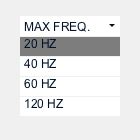
I tried looping through the items and grabbing the captionLabels one at a time, but it didn't work.
Here's the code that allowed me to change the primary captionLabel:
cp5_GUI.getController("Max Freq.")
    .getCaptionLabel()
    //.setFont(controlFonts[0])
    //.setSize(12)
    .getStyle()
    .setPaddingTop(4)
    ;
Here's what I attempted, in trying to change the captionLabels of the list items" (w/ no success)
println(i);
    println(cp5_GUI.get(ScrollableList.class, "Max Freq.").getItem(i));
    //cp5_GUI.get(ScrollableList.class, "Max Freq.").getItem(i).get("captionlabel").getStyle().setPaddingTop(4);
    //Map myMap = cp5_GUI.get(ScrollableList.class, "Max Freq.").getItem("captionLabel");
    println(cp5_GUI.get(ScrollableList.class, "Max Freq.").getItem("captionLabel"));
    println(cp5_GUI.get(ScrollableList.class, "Max Freq.").getItem(i).get("captionLabel"));
    //cp5_GUI.get(ScrollableList.class, "Max Freq.").getController("20 Hz").
Any thoughts?
-Conor
I'm trying to simply loop a 10 minute sound file in a sketch but it plays just once and then stops. Any clue/help?
void setup () { water = new SoundFile(this, "Final_mix.wav"); water.loop(.73, 0, 1.0, 0, 0 );
}
marcovvv
Hello Friends. I am trying to control the sketch size dynamically with checkBox. So, if I select the checkbox it will change size or if I un-check the checkBox then it will comeback to normal size as before. here is code.
// Need G4P library
import g4p_controls.*;


public void setup(){
  size(500, 670, JAVA2D);
  if(chkPro.isSelected()){
  size(480, 320, JAVA2D);
  }
  else{
   size(480, 600, JAVA2D);
  }


  createGUI();
  customGUI();
  // Place your setup code here

}

public void draw(){
  background(230);

}

// Use this method to add additional statements
// to customise the GUI controls
public void customGUI(){

}


public void chkProperty(GCheckbox source, GEvent event) { //_CODE_:chkPro:390305:
  println("chkPro - GCheckbox >> GEvent." + event + " @ " + millis());
}


public void createGUI(){
  G4P.messagesEnabled(false);
  G4P.setGlobalColorScheme(GCScheme.BLUE_SCHEME);
  G4P.setCursor(ARROW);
  surface.setTitle("Sketch Window");
  chkPro = new GCheckbox(this, 168, 150, 120, 20);
  chkPro.setTextAlign(GAlign.LEFT, GAlign.MIDDLE);
  chkPro.setText("Characteristics");
  chkPro.setTextBold();
  chkPro.setOpaque(false);
  chkPro.addEventHandler(this, "chkProperty");
}

// Variable declarations
// autogenerated do not edit
GCheckbox chkPro;
Thanks in Advance
Hello everyone, I am a beginner and I am trying to learn how to use processing, so i am looking at this code that imports this library "import org.apache.poi.ss.usermodel.Sheet;" I am not sure what is it for exactly, and how to use it in my sketch. when I try to copy the code and run it, just to try, it gives me an error saying this library doesn't exist.
thank you
Hello guys,
Can anyone help as I could control click the button of each button, a second window with G4P?
Below is the sample code ...
import g4p_controls.*;
GWindow window;
GButton btnTest, btnTest2;

public void setup() {
  size(160, 160);
  background(255);

  window = new GWindow(this, "Second Window", 130, 100, 400, 320, false, JAVA2D);
  window.addDrawHandler(this, "windowDraw");
  window.addMouseHandler(this, "windowMouse");
  window.addKeyHandler(this, "keyEvent");
  window.setActionOnClose(G4P.CLOSE_WINDOW);
  window.setLocation(250, 20);

  btnTest  = new GButton(window.papplet, 10, 50, 120, 30, "Test");
  btnTest2 = new GButton(window.papplet, 10, 90, 120, 30, "Test 2");
}

public void draw() {
  background(240);
}

public void windowDraw(GWinApplet appc, GWinData windata) {
  appc.background(255);
}

public void windowMouse(GWinApplet appc, GWinData windata, MouseEvent event) {
  if (event.getAction() == MouseEvent.CLICK) //??
    println("Mouse event in extra window " + frameRate);
}

public void keyEvent(GWinApplet appc, GWinData data, KeyEvent event) {
  if ((event.getAction() == KeyEvent.PRESS) && (appc.keyCode == ESC)) {
    //appc.key = 0;
    appc.keyCode = 0; //??
    println("CTRL Pressed!");
  }
}
More one detail can "cancel" the ESC key, not to close the window?
Thank you
hello, I know there is a stepbystep instruction for that,
but it seems I'm not getting anywhere by my self, so, if anyone can help me, please...
maybe it is because I don't know how to create a 'sketchbook' folder....
I'm trying to run an .mp4 video in a loop, but I keep getting this message:
the package "processing.video" does not exist. You might be missing a library.
No library found for processing.video
Libraries must be installed in a folder named 'libraries' inside the 'sketchbook' folder.**
but I've tried dozens of times to install it... what am I doing wrong?
I have downloaded this processing-video-master.zip from github. and tried to save it all over those folders:
Documents
           Processing
                       examples
                       libraries
                       modes
                       mysketch
                       tools
nothing seems to work...
please help.
I'm wanting to change the number of tick marks on a Slider in the CP5 library after the Slider has been created.
Anyone have an idea on how to do this? Example below would change the number when the space key is pressed.
import controlP5.*;

ControlP5 cp5;

void setup() {
  size(300, 125);
  noStroke();
  cp5 = new ControlP5(this);

  cp5.addSlider("slider")
    .setPosition(50, 40)
    .setSize(200, 20)
    .setRange(0, 200)
    .setNumberOfTickMarks(10)
    ;
}

void draw() {
  background(0);
}

void keyPressed() {
  if (key==' ') {
    if (cp5.getController("slider") !=null) {
      // change the number of ticks here
    }
  }
}
I am brand new to Processing and need some help. I need my program to simply play an audio file which I have successfully completed using the minim library but I would like the audio player to open in a minimized state. Is this possible? My code is below.
import ddf.minim.*;
Minim minim;
AudioPlayer song;
void setup()
{
size(100, 100);
minim = new Minim(this);
// this loads mysong.wav from the data folder
song = minim.loadFile("audio_file.mp3");
song.play();
}
void draw()
{
background(0);
}
I have used processing for a few months now. I had a question regarding the uses of Translate. I want to make it so that the grid, which I defined using vertices and beginShape(QUAD_STRIP);, lies in the center of the window. I would also like the sphere to be in the center. The code is below. Any answers?
import peasy.*;
int w = 20;
int h = 20;
int scl = 10;
float [][] grid;
PeasyCam camera;

void setup(){
  size(1000, 1000, P3D);
  grid = new float[w][h];
camera = new PeasyCam(this, 0, 0, 0, 100);
}
void draw(){
    lights();
   background (0);
      pushMatrix();
     fill(255);
   sphere(50);
   // noFill();
    noStroke();

popMatrix();

pushMatrix();

//translate(width/2, height/2, 0);
 translate(width/2, height/2 +50);
   rotateX(PI/2.8);                      //setting up perspective

   translate(-w/2, -h/2);
    for(int y = 0; y
[see below for code]
I've just done a new install of Processing 3 on an iMac.
When I run the example sketch "oneFrame" that uses the PDF Export library, there is no file created (that I'm able to find using the Finder on Mac OS X). The same is true of DXF Export. I've looked for the libraries in the Processing folder, and using the find command – no luck finding them. Yet, no error is thrown when I run the sketch that begins by importing the pdf library.
Sorry if I'm making an obvious mistake, but I'd be grateful if someone could point it out to me.
Thanks.
Hello!!!
Sorry if I put a lot of code. I'm doing an application for a rhythm test, I connect the Arduino to sense when the person hit the sensor and send the data to Processing; in the other hand,I have an audio file with the rhythm that the person should follow. I use analyze() from Sound Library to obtain the Amplitud of the audio file. I send both of the data -the sensor and the amplitud to an excel file to obtain a graphic. Everything works independently but when I try to incorporate analyze() to the graphic interface, I try only with the "stop - btnStopSeq3" and "btnback3" buttons don´t works and appear a window: the program should be reopen, Report or Ignore. And the following:
I´m going to put all the tabs that I´m using, but I thing that only the problem is around PruebaDatosPantalla5-SongScreen-Analyze.
IN THE Tab PruebaDatosPantalla5:
import processing.serial.*; import g4p_controls.*; import processing.sound.*;
import java.util.*; import java.text.*;
Serial myPort; Table dataTable; Table table;
int numReadings = 500; int readingCounter = 0;
String val; String fileName; String val1; float New_rms_scaled;
Amplitude rms;
float scale = 5; float smooth_factor = 0.25; float sum;
Serial mipuerto;
GImageButton btnPlay, btnOptions1, btnOptions2, btnQuit_game, btnGame_info, btnPlay1, btnPlay2, btnPlaySeq3, btnPlaySeq5, btnPlaySeq7, btnPlayFile2, btnPlayFile3, btnStopSeq3, btnStopSeq5, btnStopSeq7, btnStopFile2, btnStopFile3, btnBackSeq3, btnBackSeq5, btnBackSeq7, btnBack2, btnBack3, btnHelp1, btnHelp2, btnHelp3, btnHelp4; GLabel lblOut, lblTempo, lblSong, lblCambiotiempo, lblCambiocancion; GCustomSlider sdrTempo, sdr; GDropList dplSong, dplCambiotiempo, dplCambiocancion, dplTempo; GPanel help_screen;
SoundFile seq3; SoundFile seq5; SoundFile seq7; SoundFile seq16; SoundFile seq19; SoundFile seq20; SoundFile seq21; SoundFile file2; SoundFile file3;
int red, green, blue;
long timer; String[] files;
PImage Seq16; PImage Seq19; PImage Seq20; PImage Seq21;
int j; int p; int i = 0; int mode = 1; int mute = 7; int audio = 1;
float k = 1;
void setup() { // this is run once.
//println(Serial.list());
String portName = Serial.list()[1];
myPort = new Serial(this, portName, 9600);
table = new Table();
table.addColumn("Milisec"); table.addColumn("sensor"); table.addColumn("audio");
size(1024, 768);
cursor(CROSS);
make_inicio_screen();
make_settings_screen();
make_song_screen();
inicio_screen_visible(false);
settings_screen_visible(false);
song_screen_visible_Seq3(false);
song_screen_visible_Seq5(false);
song_screen_visible_Seq7(false);
song_screen_visible(false);

smooth();
space = loadImage("diseno.jpg");

prueba = loadImage("notasborder.jpg");
cursor(CROSS);

Seq3 = loadImage("Seq3.jpg");
Seq5 = loadImage("Seq5.jpg");
Seq7 = loadImage("Seq7.jpg");
Seq16 = loadImage("Seq16.jpg");
Seq19 = loadImage("Seq19.jpg");
Seq20 = loadImage("Seq20.jpg");
Seq21 = loadImage("Seq21.jpg");
}
void draw() { // this is run repeatedly.
if (myPort.available()>0)
{
val = myPort.readStringUntil('\n');
//println(val); //Shows received data
}
TableRow newRow = table.addRow(); //adds a row for new reading

newRow.setInt("Milisec", millis());
//println(millis());

readingCounter++; //writes file every numReadings reading cycles

  newRow.setString("sensor", val);
  newRow.setFloat("audio", New_rms_scaled);

  table.trim("sensor");

saveTable(table, "data/prueba.csv"); //saves the data as a .csv
/////
switch(mode){
case 1:
inicio_screen_visible(true);
settings_screen_visible(false);
song_screen_visible_Seq3(false);
song_screen_visible_Seq5(false);
song_screen_visible_Seq7(false);
song_screen_visible(false);
inicio_screen();
break;
case 2:
settings_screen_visible(true);
inicio_screen_visible(false);
song_screen_visible_Seq3(false);
song_screen_visible_Seq5(false);
song_screen_visible_Seq7(false);
song_screen_visible(false);
settings_screen();
break;
case 3:
song_screen_visible_Seq3(true);
song_screen_visible_Seq5(true);
song_screen_visible_Seq7(true);
song_screen_visible(true);
inicio_screen_visible(false);
settings_screen_visible(false);
song_screen();
break;
case 4:
analyze();
}
}
public void handleButtonEvents(GImageButton button, GEvent event){
/////Botones InicioScreen
if(button == btnPlay1){
mode = 3;
}
if(button == btnOptions1){
mode = 2;
}
if(button == btnQuit_game){
exit();
}
//////BotonesSettingsScreen
if(button == btnBack2){ mode = 1; } if(button == btnHelp2){ mode = 5; }
////Botones SongScreen /// if(button == btnPlaySeq3){ loop(); seq3.play(); rms = new Amplitude(this); rms.input(seq3); mode = 4; }
if(button == btnStopSeq3){ loop(); seq3.stop(); //mode = 4; }
if(button == btnBackSeq3){ loop(); seq3.stop(); mode = 1; } /////// if(button == btnPlaySeq5){ loop(); //soundfile.play(); file3.play(k, 1.0); }
if(button == btnStopSeq5){ loop(); file3.stop(); }
if(button == btnBackSeq5){ loop(); file3.stop(); mode = 1; } /////// if(button == btnPlaySeq7){ loop(); //soundfile.play(); file2.play(k, 1.0); }
if(button == btnStopSeq7){ loop(); file2.stop(); }
if(button == btnBackSeq7){ loop(); file2.stop(); mode = 1; }
if(button == btnBack3){ loop(); file3.stop(); mode = 1; }
if(button == btnHelp1){ loop(); mode = 5; }
}
void handleSliderEvents(GValueControl slider, GEvent event){ /////Slider InicioScreen ////Slider SettingScreen if (slider == sdrTempo); println(sdrTempo.getValueF()+ " " + event); k = slider.getValueF(); }
public void handleDropListEvents(GDropList list, GEvent event){
if(list == dplSong);
println(sdrTempo.getValueF()+ " " + event);
dplSong.getSelectedIndex();
}
///////////////////////////////////////////////////////////////////////////////////////////////////////////////
IN THE TAB ANALYZE:
void analyze(){
sum += (rms.analyze() - sum) * smooth_factor; float rms_scaled = sum(height/2)scale;
  ellipse(width/2, height/2, rms_scaled, rms_scaled);
  //println(rms_scaled);

  float New_rms_scaled = map(rms_scaled, 0, 97, 0, 410);
  println(New_rms_scaled);
} /////////////////////////////////////////////////////////////////////////////////////////////////////////////// /////////////////////////////////////////////////////////////////////////////////////////////////////////////// IN THE TAB SONGSCREEN:
int cancion;
void song_screen(){
song_screen_visible(true); //frameRate(1);
seq3 = new SoundFile(this, "Seq3.aiff"); seq5 = new SoundFile(this, "Seq5.aiff"); seq7 = new SoundFile(this, "Seq7.aiff"); seq16 = new SoundFile(this, "Seq16.aiff"); seq19 = new SoundFile(this, "Seq19.aiff"); seq20 = new SoundFile(this, "Seq20.aiff"); seq21 = new SoundFile(this, "Seq21.aiff"); file2 = new SoundFile(this, "2.aiff"); file3 = new SoundFile(this, "3.aiff");
switch(cancion){ case 0: Seq3partitura(); Seq3musica(); song_screen_visible(true); break;
case 1:
Seq5partitura();
Seq5musica();
song_screen_visible(true);
break;

case 2:
Seq7partitura();
Seq7musica();
song_screen_visible(true);
break;
}
int l = dplSong.getSelectedIndex(); cancion = l;
smooth();
}
void make_song_screen(){
int y = 10;
G4P.setCursor(ARROW); /////// files = new String[]{ "stopOff.jpg", "stopOn.jpg" }; btnStopSeq3 = new GImageButton(this, 350, 600, files);
files = new String[]{ "play1Off.jpg", "play1On.jpg" }; btnPlaySeq3 = new GImageButton(this, 600, 600, files);
files = new String[]{
"backOff.jpg", "backOn.jpg"
};
btnBackSeq3 = new GImageButton(this, 5, 5, files);
////////
files = new String[]{
"stopOff.jpg", "stopOn.jpg"
};
btnStopSeq5 = new GImageButton(this, 350, 600, files);
files = new String[]{ "play1Off.jpg", "play1On.jpg" }; btnPlaySeq5 = new GImageButton(this, 600, 600, files);
files = new String[]{
"backOff.jpg", "backOn.jpg"
};
btnBackSeq5 = new GImageButton(this, 5, 5, files);
////////
files = new String[]{
"stopOff.jpg", "stopOn.jpg"
};
btnStopSeq7 = new GImageButton(this, 350, 600, files);
files = new String[]{ "play1Off.jpg", "play1On.jpg" }; btnPlaySeq7 = new GImageButton(this, 600, 600, files);
files = new String[]{ "backOff.jpg", "backOn.jpg" }; btnBackSeq7 = new GImageButton(this, 5, 5, files);
lblSong = new GLabel(this, 300, y+50, 200, 20, "Choose Exercice"); lblSong.setTextBold(); String[] items = new String[]{ "Seq3", "Seq5", "Seq7", "Seq16", }; dplSong = new GDropList(this, 475, y+50, 250, 200, 10); dplSong.setItems(items, 0);
}
void song_screen_visible(boolean visible){ dplSong.setVisible(visible); lblSong.setVisible(visible); }
IN THE TAB SEQ3:
PImage Seq3;
void Seq3musica(){
stroke(0); song_screen_visible_Seq7(false); song_screen_visible_Seq5(false);
}
void Seq3partitura(){ background(255); image(Seq3, 360, 240);
}
void song_screen_visible_Seq3(boolean visible){ btnPlaySeq3.setVisible(visible); btnStopSeq3.setVisible(visible);
} /////////////////////////////////////////////////////////////////////////////////////////////////////////////// IN THE TAB SONGSETTINGS:
int cancion;
void song_screen(){
song_screen_visible(true);
seq3 = new SoundFile(this, "Seq3.aiff");
switch(cancion){ case 0: Seq3partitura(); Seq3musica(); song_screen_visible(true); break;
case 1:
Seq5partitura();
Seq5musica();
song_screen_visible(true);
break;

case 2:
Seq7partitura();
Seq7musica();
song_screen_visible(true);
break;
}
int l = dplSong.getSelectedIndex(); cancion = l;
smooth();
}
void make_song_screen(){
int y = 10;
G4P.setCursor(ARROW); /////// files = new String[]{ "stopOff.jpg", "stopOn.jpg" }; btnStopSeq3 = new GImageButton(this, 350, 600, files);
files = new String[]{ "play1Off.jpg", "play1On.jpg" }; btnPlaySeq3 = new GImageButton(this, 600, 600, files);
files = new String[]{
"backOff.jpg", "backOn.jpg"
};
btnBackSeq3 = new GImageButton(this, 5, 5, files);
////////
files = new String[]{
"stopOff.jpg", "stopOn.jpg"
};
btnStopSeq5 = new GImageButton(this, 350, 600, files);
files = new String[]{ "play1Off.jpg", "play1On.jpg" }; btnPlaySeq5 = new GImageButton(this, 600, 600, files);
files = new String[]{
"backOff.jpg", "backOn.jpg"
};
btnBackSeq5 = new GImageButton(this, 5, 5, files);
////////
files = new String[]{
"stopOff.jpg", "stopOn.jpg"
};
btnStopSeq7 = new GImageButton(this, 350, 600, files);
files = new String[]{ "play1Off.jpg", "play1On.jpg" }; btnPlaySeq7 = new GImageButton(this, 600, 600, files);
files = new String[]{ "backOff.jpg", "backOn.jpg" }; btnBackSeq7 = new GImageButton(this, 5, 5, files);
lblSong = new GLabel(this, 300, y+50, 200, 20, "Choose Exercice"); lblSong.setTextBold(); String[] items = new String[]{ "Seq3", "Seq5", "Seq7", "Seq16", }; dplSong = new GDropList(this, 475, y+50, 250, 200, 10); dplSong.setItems(items, 0);
}
void song_screen_visible(boolean visible){ dplSong.setVisible(visible); lblSong.setVisible(visible); }
/////////////////////////////////////////////////////////////////////////////////////////////////////////////// IN THE TAB INICIOSCREEN:
PImage space = null; PImage space2 = null;
void inicio_screen(){ inicio_screen_visible(true); image(space, 0, 0); }
void make_inicio_screen(){ files = new String[]{ "playOff.jpg", "playOn.jpg" }; btnPlay1 = new GImageButton(this, 50, 700, files);
files = new String[]{ "optionsOff.jpg", "optionsOn.jpg" }; btnOptions1 = new GImageButton(this, 470, 700, files);
files = new String[]{ "quit_gameOff.jpg", "quit_gameOn.jpg" }; btnQuit_game = new GImageButton(this, 880, 700, files);
}
void inicio_screen_visible(boolean visible){ btnPlay1.setVisible(visible); btnOptions1.setVisible(visible); btnQuit_game.setVisible(visible); }
Does anyone know of a way to come up with a single function that can ease all control values?
Hello
I've written een sketch that converts certain parts of a movie file into animated gifs. It works pretty well. The "problem" is the way it works.
Right now I display the movie in my processing window and while it's playing (at standard 25fps) I capture frames using the gifAnimation addon and export them. so the speed at which my movie is converted to gifs is dependent on the length of my movie. so a 2 hour movie takes...2 hours to convert.
I would like to speed up this process. I would like to create gifs without having to play and display them in my processing window. Load frame X till Y straight from the filepath into a buffer (don't know if this is the right term) and export them. I hope this makes sense.
Hello,
Im trying to do some image processing with the openCV library and im trying to connect my android phone's camera to processing through an app called IP-Webcam, but I cant get the IP-Capture library to connect to my phone, heres the code im using :
` import gab.opencv.*; import java.awt.*; import ipcapture.*;
IPCapture cam; OpenCV opencv;
void setup() { size(640, 480); cam = new IPCapture(this, "192.168.1.9:8080", "", ""); //local ip for the ipwebcam cam.start(); opencv = new OpenCV(this, 640, 480); opencv.loadCascade(OpenCV.CASCADE_FRONTALFACE);
}
void draw() { scale(2); //println(cam.isAvailable()); if (cam.isAvailable()) { cam.read(); image(cam,0,0); }
opencv.loadImage(cam);
noFill(); stroke(0, 255, 0); strokeWeight(3); Rectangle[] faces = opencv.detect(); println(faces.length);
for (int i = 0; i < faces.length; i++) { println(faces[i].x + "," + faces[i].y); rect(faces[i].x, faces[i].y, faces[i].width, faces[i].height); } } `
The program doesnt find the camera, the cam.isAvailable() function returns false.
Thank you.
Hello Processing Forum,
I am working on a 2010 Mac with Processing 2. I am running a simple program with 3 ellipse masks over a video. Whenever I run the video the sound goes silent at about 20-30 seconds. I have tried a variety of codecs including mpeg and H264 and even other videos. All seem to out to silence pretty quickly. I am dying here trying to get it up for a video installation. I really want the sound to play. I would even be up for loading the sound as separate from the video in Processing 2 if that made it work. I would be thrilled with any advice on this-- this is the code I am using:
import java.util.*; import processing.video.*;
//creating Movie object Movie vid; //creating mask image PImage img; // movement speed of ellipses in pixels int moveSpd = 5;
// class representing ellipse class ellipseMask { // x,y position of center float x; float y; // x and y radius float xr; float yr;
//constructor ellipseMask(float x,float y,float xr,float yr) { this.x = x; this.y = y; this.xr = xr; this.yr = yr; }
}
// initializing ellipse mask objects - CHANGE HEIGHT & WIDTH SCALE HERE ellipseMask e1 = new ellipseMask(156,280,68,87); ellipseMask e2 = new ellipseMask(512,280,68,87); ellipseMask e3 = new ellipseMask(868,280,68,84);
// initialize transparent and black colors color trans = color(255,255,255,0); color black = color(0,0,0,255);
void setup() { size(1024,768); // loading video vid = new Movie(this,"test2-QuickTimeH.264.mov"); //making video run in loop vid.loop();
// create blank image of screen size img = createImage(width,height,ARGB); }
void draw() { background(255);
// displaying current video frame image(vid,0,0,width,height);
// loading pixel array, so we can set it img.loadPixels();
// iterating over all pixels indices in mask image for(int i=0;i<widthheight;i++) { // computing x,y coordinates of index float y = (float)( i/(int)width ); float x = (float)(i - ywidth);
// checking if points are inside ellipses using formula (x-h)^2/rx^2 + (y-k)^2/ry^2 <= 1 for disk/point intersection
if(  ((x-e1.x)*(x-e1.x))/(e1.xr*e1.xr) +  ((y-e1.y)*(y-e1.y))/(e1.yr*e1.yr) <= 1 || ((x-e2.x)*(x-e2.x))/(e2.xr*e2.xr) +  ((y-e2.y)*(y-e2.y))/(e2.yr*e2.yr) <= 1 ||  ((x-e3.x)*(x-e3.x))/(e3.xr*e3.xr) +  ((y-e3.y)*(y-e3.y))/(e3.yr*e3.yr) <= 1  )
{
// changing pixel array value of mask image to transparent if its inside ellipse
img.pixels[i] = trans;
}
else
{
// changing pixel array value of mask image to black if its outside ellipse
img.pixels[i] = black;
}
}
// update mask image using the pixel array img.updatePixels();
// displaying mask image image(img,0,0,width,height);
}
// video event void movieEvent(Movie m) { m.read(); }
// called upon key press TO CHANGE POSITION OF ELLIPSES void keyPressed() { // moving ellipse 1 if(keyCode==UP){e1.y -= moveSpd;} else if(keyCode==DOWN){e1.y += moveSpd;} else if(keyCode==LEFT){e1.x -= moveSpd;} else if(keyCode==RIGHT){e1.x += moveSpd;}
// moving ellipse 2 if(key=='w'){e2.y -= moveSpd;} else if(key=='s'){e2.y += moveSpd;} else if(key=='a'){e2.x -= moveSpd;} else if(key=='d'){e2.x += moveSpd;}
// moving ellipse 3 if(key=='i'){e3.y -= moveSpd;} else if(key=='k'){e3.y += moveSpd;} else if(key=='j'){e3.x -= moveSpd;} else if(key=='l'){e3.x += moveSpd;}
}
who had procontroll lib? can you give me??please!
Hello !
Help me please with such issue:
I use UnfoldingMaps in my project (0.9.6v) and Processing 3.
All is good but my map do not want to be scalable with the mouse wheel . I was looking for a long time the solution of this problem, but I did not achieved success. Will be grateful for any help!
This is a list of code, that i use (not all code, just a part of initialization of map) :
public void settings() {
    Dimension display = displayMeasure();
    size(display.width, display.height, FX2D);
}

public void setup() {
    map = new UnfoldingMap(this, 0, 0, 1000, 800, new Google.GoogleMapProvider());
    map.setTweening(true);
    surface.setResizable(true);
    MapUtils.createDefaultEventDispatcher(this, map);
}