Is there a way to display images based on how high the frequency the program is detecting? Like if the program detects a frequency of around 1000 Hz, it will display one image representing an emotion, but around 500 a different image is displayed instead. I'm also working with an array for 4 images so far.
↧
How to Display Images based on frequency?
↧
how to introduce speech recognition into game.
Hi,
I am currently working on a university final year project, where I am taking an existing piece of work and adding a useful element to it. I have started building the classic brick breaker game but I am not sure how can i use the speech-to-text library to introduce speech commands into the game, such as 'Run' to start the game and move the paddle by saying 'L' or 'R' (Left and Right).. I would like to configure the commands to the amount of pixels the paddle moves across..such as have default commands set as '30 pixels' and further commands such as 'L1' and 'R2' could be used to move a further distance '40pixels' maybe.
Thank you.
Current Code:
        float ballX;        // x coordinate of the ball
        float ballY;        // y  coordinate of the ball
        float ballW;        // width of the ball
        float ballH;        // height of the ball
        float moveBallX;    // move the ball from left to right randomly
        float moveBallY;    // move the ball from top to bottom randomly
        float paddleX;      // x coordinate of the paddle
        float paddleY;      // y coordinate of the paddle
        float paddleW;      // width of the paddle
        float paddleH;      // height of the paddle
        float movePaddleX;  // move the paddle left or right by 30 pixels


        void setup () {

          size (350, 400);

          // Ball parameters; initial x, y coordinates, and width, height of the ball.
          ballX = 20;
          ballY = 20;
          ballW = 15;
          ballH = 15;

          // Move the ball's coordinate positions randomly in the game.
          moveBallX = random(1, 4);
          moveBallY = random(1, 4);

          // Paddle parameters; initial x, y coordinates, and width, height of the paddle.
          paddleX = width/2;
          paddleY = height - 20;
          paddleW = 50;
          paddleH = 10;

          // Move the Paddle's coordinate position
          movePaddleX = 30;
        }

        void draw () {
          background (0);
          ellipse (ballX, ballY, ballW, ballH); // ball
          noStroke();
          rect (paddleX, paddleY, paddleW, paddleH); // paddle

          // Add the moving motion to the ball.
          ballX = ballX + moveBallX;    //the current x position of the ball is moved by the variable moveBallX.
          ballY = ballY + moveBallY;    ///the current y position of the ball is moved by the variable moveBallY.


          //IF statements to control the ball's x coordinate, rebounce the ball when it hits the right or left edge.

          if (ballX > width) {
            moveBallX = -moveBallX; // The values become the opposite, and allow a rebounce.
          }

          if (ballX < 0) {

            moveBallX = -moveBallX;  // The values become opposite, and allow a rebounce.
          }

          //IF statements to control the ball's y, rebounce the ball when it hits the top or bottom edge.

          if (ballY > paddleY)       // 'paddleY' is used instead of 'height'. to show a bounce on the paddle.
          {
            moveBallY = -moveBallY; // The values become the opposite, and allow a rebounce.
          }

          if (ballY < 0) {

            moveBallY = -moveBallY; // The values become the opposite, and allow a rebounce.
          }

        }

        void keyPressed() {
          if (key == CODED) {
            if (keyCode == LEFT) {         //when the LEFT key is pressed, the paddle is moved to the left by 30 pixels.

              paddleX = paddleX - movePaddleX;
            } else if (keyCode == RIGHT) {  //when the RIGHT key is pressed, the paddle is moved to the right by 30 pixels.

              paddleX = paddleX + movePaddleX;
            }
          }
        }


        //Help acquired from the following sources:
        //https://processing.org/examples/
        //http://www.openprocessing.org/sketch/134612
        //http://drdoane.com/thinking-through-a-basic-pong-game-in-processing/
↧
↧
How to smoothly playback 1080p video ?
Hi,
I am trying to playback 1080p video in Processing and using the Loop sample from the video library looks a bit choppy. What's the best way to playback 1080p video smoothly in Processing on Linux 64bit ?
I'm using Processing 3.0.2 64bit and the Linux Mint info is this:
RELEASE=17.3
CODENAME=rosa
EDITION="Cinnamon 64-bit"
DESCRIPTION="Linux Mint 17.3 Rosa"
DESKTOP=Gnome
TOOLKIT=GTK
NEW_FEATURES_URL=http://www.linuxmint.com/rel_rosa_cinnamon_whatsnew.php
RELEASE_NOTES_URL=http://www.linuxmint.com/rel_rosa_cinnamon.php
USER_GUIDE_URL=help:linuxmint
GRUB_TITLE=Linux Mint 17.3 Cinnamon 64-bit
Thank you, George
↧
Make objects/shapes appear on top of other objects/shapes dynamically
I have a bunch of objects that are square videos(in an array). If the mouse hovers over one of them - it will expand (and play). the problem I have is that if an object expands but there is an object next to it and that object happens to be run after the expanding one in draw then that object will always be on top of the other object.
Is there a way to dynamically change the order in which draw runs? So I could say if object active - run last in draw (so its on top of all other objects etc.
Thanks for the help! (code below - although you would need to replace the mp3 and .mov in lines 22/23 to run this, and I have the video library and minim installed)
import processing.video.*;

import ddf.minim.*;
import ddf.minim.analysis.*;
import ddf.minim.effects.*;
import ddf.minim.signals.*;
import ddf.minim.spi.*;
import ddf.minim.ugens.*;

Minim minim;
AudioSample sample;
Tile[]Tiles = new Tile[10];

void setup() {
  fullScreen(2);
  //noCursor();
  imageMode(CENTER);
  minim = new Minim(this);

  for (int i = 0; i< 10; i++){
    Tiles[i]= new Tile(this);
    Tiles[i].setMovie("TORCH_2_1.mov");
    Tiles[i].setAudio(minim, "Paper Rustle_1.mp3");
  }


}

void draw() {
  background(0);

  Tiles[0].presentTile(200, 200);
  Tiles[1].presentTile(225, 200);
  Tiles[2].presentTile(250, 200);
  Tiles[3].presentTile(275, 200);
  Tiles[4].presentTile(300, 200);
  Tiles[5].presentTile(325, 200);

}

class Tile {
  PApplet app;
  Movie movie = null;
  AudioSample sample = null;

  boolean overBox = false;
  boolean canTrigger = true;
  float boxMax = 100;
  float boxMin = 25;
  int boxSize;

  Tile(PApplet papp) {
    app = papp;
    boxSize = 25;
  }

  void setMovie(String fname) {
    movie = new Movie(app, fname);
    movie.loop();
    movie.pause();
  }

  void setAudio(Minim m, String fname) {
    sample = m.loadSample(fname, 512);
  }

  void isOver(float x, float y) {
    overBox = (mouseX > x-(boxSize/2) && mouseX < x +(boxSize/2) &&
    mouseY > y-(boxSize/2) && mouseY < y+(boxSize/2));
  }


  void presentTile(float bx, float by) {

    isOver(bx, by);
    if (movie != null) {
      if (movie.available() == true)
        movie.read();
      if (overBox && (boxSize < boxMax)) {
        image(movie, bx, by, boxSize++, boxSize++);
        movie.loop();
      }
      if (!overBox && boxSize > boxMin ) {
        image(movie, bx, by, boxSize-=1, boxSize-=1);
        movie.pause();

      }
      image(movie, bx, by, boxSize, boxSize);
    }
    if (sample != null) {
      if (canTrigger && overBox) {
        sample.trigger();
        canTrigger = false;
      }
      if (!overBox) {
        sample.stop();
        canTrigger = true;
      }
    }
  }
}
↧
Movie playback in Linux Ubuntu 16.04
Hello there.
I'm trying to use the movie examples, but I can't get it to work. I had similar problems when using capture, but installing some libraries related and from gstreamer, I managed it to work. The same is not happening in what regards "Movie". I've found some posts in different forums about this same issue and all were pointing to the installation of libraries, which I did, but no luck so far.
I'm running Ubuntu Studio 16.04. I'm not getting any errors, which make difficult to locate what exactly is not working.
I appreciate any directions given, and if somebody out there is having the same problems, say hello and maybe we can try to find a solution together.
best regards, Gil
↧
↧
How to modulate the frequency of samples
Hi! I'm making a synthesizer by using Minim on processing, I'd like to play notes by changing the frequency of a sample found on freewavesamples.com. Actually i only can play notes with the playNote() function. There's is many examples showing how to modulate the "default sound' of Minim but I don't know how to do this with a sample...
↧
ControlP5 Slider Exponential
Hi, I'm using quite a couple of controlP5 sliders but for some of them I'd like more precision on the lower end of the scale. Is there a possibility to change the interpolation between the range of a slider?
Thanks.
↧
reorder draw/stack index?
Hi , Im having a problem with objects (Tiles) - I set where a bunch of Tiles appear on the canvass and if the mouse cursor is over one of the Tiles it enlarges and plays a video. All this is working fine but I would like a way to say - if mouse cursor over object - draw this object last so that it is drawn over the other objects (effectively masking them out as it enlarges).
I had seen this; http://www.openprocessing.org/sketch/50914 - about drawing stack order.
This example is nearly exactly what I want to do but the problem is I still need to be able to set exactly where these objects appear on the canvass so I can't create them in a if statement or loop - they need to be set individually. Is there a way to re order when they are run though draw when the mouse hovers over them?
I had tried creating a discussion before but unfortunately I managed to put it in the wrong category so am re posting this here.
Code below - and thanks for the help!
import processing.video.*;

import ddf.minim.*;
import ddf.minim.analysis.*;
import ddf.minim.effects.*;
import ddf.minim.signals.*;
import ddf.minim.spi.*;
import ddf.minim.ugens.*;

Minim minim;
AudioSample sample;
Tile[]Tiles = new Tile[10];

void setup() {
  fullScreen(2);
  //noCursor();
  imageMode(CENTER);
  minim = new Minim(this);

  for (int i = 0; i< 10; i++){
    Tiles[i]= new Tile(this);
    Tiles[i].setMovie("TORCH_2_1.mov");
    Tiles[i].setAudio(minim, "Paper Rustle_1.mp3");
  }


}

void draw() {
  background(0);

  Tiles[0].presentTile(200, 200);
  Tiles[1].presentTile(225, 200);
  Tiles[2].presentTile(250, 200);
  Tiles[3].presentTile(275, 200);
  Tiles[4].presentTile(300, 200);
  Tiles[5].presentTile(325, 200);

}

class Tile {
  PApplet app;
  Movie movie = null;
  AudioSample sample = null;

  boolean overBox = false;
  boolean canTrigger = true;
  float boxMax = 100;
  float boxMin = 25;
  int boxSize;

  Tile(PApplet papp) {
    app = papp;
    boxSize = 25;
  }

  void setMovie(String fname) {
    movie = new Movie(app, fname);
    movie.loop();
    movie.pause();
  }

  void setAudio(Minim m, String fname) {
    sample = m.loadSample(fname, 512);
  }

  void isOver(float x, float y) {
    overBox = (mouseX > x-(boxSize/2) && mouseX < x +(boxSize/2) &&
    mouseY > y-(boxSize/2) && mouseY < y+(boxSize/2));
  }


  void presentTile(float bx, float by) {

    isOver(bx, by);
    if (movie != null) {
      if (movie.available() == true)
        movie.read();
      if (overBox && (boxSize < boxMax)) {
        image(movie, bx, by, boxSize++, boxSize++);
        movie.loop();
      }
      if (!overBox && boxSize > boxMin ) {
        image(movie, bx, by, boxSize-=1, boxSize-=1);
        movie.pause();

      }
      image(movie, bx, by, boxSize, boxSize);
    }
    if (sample != null) {
      if (canTrigger && overBox) {
        sample.trigger();
        canTrigger = false;
      }
      if (!overBox) {
        sample.stop();
        canTrigger = true;
      }
    }
  }
}
↧
3dconnexion SpaceMouse Pro / Spacenavigator
I've been searching for days on forums to find a library that works on the 3dconnexion devices for Processing V3. In the past it looks there was a working proControll library which is now replaced with the Game Control Plus. But when I connect a Space Navigator and using the Gcp_ShowDevices sketch, it does not show the space navigator in the list... Has anyone a working SpaceNavigator in Processing 3?
↧
↧
How can you make effects/glitch/lay videos over the webcam when you click a button?
I got live video on screen with this code:
import processing.video.*;
Capture cam;
float xpos; float ypos;
void setup() {
size(1920,1080);
String[] cameras = Capture.list();
cam = new Capture(this, cameras[1]);
cam.start();
}
void draw() {
if (cam.available() == true) {
cam.read();
image(cam, 339,154);
}
}
However, I need to know how to put images/videos on top of it. Like putting animations over it, or changing up the colors/putting a filter, ect. I think what I need might be the blend function, but I'm not sure how to get it to work. For example, how could I blend flashing random colors using random(255) over the video? Also, can I put distortions on the webcam, as in making things pix elated, warped, etc?
In my project, I will need it to start out as a normal webcam, then when you click a button the effects happen. How would I go about doing that? I've already made a button that responds to clicking, but don't know how to make it cue the video effects.
Also, I have one last question. Can you make a button that will clear everything completely and put an entirely new sketch up? Like on webpages when you click a button and it takes you to a new webpage. If so, how?)
I'm really new at processing and don't understand anything! Thank you in advance!
↧
Why Music visualiser does not work, when I add an "ellipse" into code?
                        int radius = 100;
                        float nScale = 200;

                        import ddf.minim.*;
                        import ddf.minim.analysis.*;

                        Minim minim;
                        AudioPlayer player;
                        AudioMetaData meta;
                        BeatDetect beat;

                        float noiseMulti = 300;

                        void setup() {
                          size(700, 700, P2D);
                          background(0);
                          smooth();
                          minim = new Minim(this);
                          player = minim.loadFile("Music.mp3");
                          player.loop();
                          meta = player.getMetaData();
                          beat = new BeatDetect(player.bufferSize(), player.sampleRate());
                          beat.setSensitivity(300);

                          ellipseMode(CENTER);
                        }

                        void draw() {
                          noStroke();
                          fill(0);
                          rect(0, 0, width, height);
                          translate(width/2, height/2);


                          beat.detect(player.mix);
                          if (beat.isKick()) {
                            noiseMulti = 300;
                            nScale = 150;
                          } else {
                            if (nScale > 100) nScale *= 0.9;
                            noiseMulti *= 0.5;
                          }

                          stroke(255);
                          for (int lat = -90; lat < 90; lat+=2)
                          {
                            for (int lng = -180; lng < 180; lng+=2)
                            {
                              float _lat = radians(lat);
                              float _lng = radians(lng);
                              // noise
                              float n = noise(_lat * noiseMulti / 100, _lng * noiseMulti / 100 + millis() );

                              float x = (radius + n * nScale) * cos(_lat) * cos(_lng);
                              float y = (radius + n * nScale) * sin(_lat) * (-1);
                              float z = (radius + n * nScale) * cos(_lat) * sin(_lng);

                              point(x, y, z);
                            }
                          }

                         stroke(77,200,100);
                         strokeWeight(30);
                         ellipse(width/2,height/2,100,100 );
                        }

                        void stop()
                        {
                          player.close();
                          minim.stop();
                          super.stop();
                        }
↧
Issue installing processing-sound library
I am new to Processing and I have some issues installing the processing-sound library. I installed the oscP5 libary here and it works fine: C:\Users\51syvjan\Documents\Processing\libraries\oscP5
However when downloading processing-sound-master zip from here: _https://github.com/processing/processing-sound and extracting it to: C:\Users\51syvjan\Documents\Processing\libraries\processing-sound it is not picked up by Processing. Any suggestions on what the issue can be?
↧
How can you blend a video into a webcam screen, or add effects to the live video?
I got live video on screen with this code: import processing.video.*;
Capture cam;
float xpos; float ypos;
void setup() {
size(1920,1080); String[] cameras = Capture.list(); cam = new Capture(this, cameras[1]); cam.start(); } void draw() { if (cam.available() == true) { cam.read(); image(cam, 339,154); } }
However, I need to know how to put images/videos on top of it. Like putting animations over it, or changing up the colors/putting a filter, ect. I think what I need might be the blend and/or saveFrame() function, but I'm not sure how to get it to work. For example, how could I blend flashing random colors using random(255) over the video? Also, can I put distortions on the webcam, as in making things pix elated, warped, etc?
In my project, I will need it to start out as a normal webcam, then when you click a button the effects happen. How would I go about doing that? I've already made a button that responds to clicking, but don't know how to make it cue the video effects.
Also, I have one last question. Can you make a button that will clear everything completely and put an entirely new sketch up? Like on webpages when you click a button and it takes you to a new webpage. If so, how?)
I'm really new at processing and don't understand anything! Thank you in advance!
↧
↧
High CPU usage with Video
Hello all,
I'm fairly new to Processing. I'm using Processing 3.0 on a 2013 Macbook Pro running El Capitan. I'm doing, what seems to me, some fairly simple video manipulation for an installation I'm working on. For whatever reason (and this is the case with example sketches just drawing video frames to the window) I'm getting something like 100%-150% CPU usage with these simple sketches, even if I try limiting the frame rate with frameRate(). Am I doing something wrong here?
↧
Not sure how to go about it. (play video on key press)
Hi,
I'm trying to figure out how I would go about creating a code that will trigger a video when I hit a certain key on the keyboard. the key doesn't have to be specific, I have found various other example codes that trigger other things when you hit a key but not ones that integrate a video. Any help would be greatly appreciated! Thank you.
↧
please please can someone help me with this codemy submission is in few hours or i will fail
I need to make a simple bar chart or anything to put in my sketch every time i try to link the data it gives me errors can you help.
PImage img;
Drop[] drops = new Drop[300];

void setup() {
  size(900, 900);
  background(0);
   stroke(255);
   img = loadImage("http://" + "www.paperhi.com/thumbnails/detail/20130314/black%20and%20white%20maps%20continents%20time%20zones%20world%20map%20cartography%202560x1600%20wallpaper_www.paperhi.com_38.jpg");
 imageMode (CENTER);
  for (int i = 0; i < drops.length; i++) {
    drops[i] = new Drop();
  }
}

void draw() {

  background(0);

  // Draw the image upper centred of the sketch.
  image(img,500,200,1000, 400);
  //Change image transparency.
  tint(255,127);
  for (int i = 0; i < drops.length; i++) {
    drops[i].fall();
    drops[i].show();
  }
}

class Drop {
  float x = random(width);
  float y = random(-500, -200);
  float z = random(0, 20);
  float len = map(z, 0, 20, 10, 20);
  float yspeed = map(z, 0, 10, 1, 10);

  void fall() {
    y = y + yspeed;
    float grav = map(z, 0, 20, 0, 0.2);
    yspeed = yspeed + grav;

    if (y > height) {
      y = random(-200, -100);
      yspeed = map(z, 0, 20, 4, 10);
    }
  }

  void show() {
   stroke (127,0,0);
    line(x, y, x, y+len);
  }
}
I just need any chart like a line graph or anything bar chart to link this data 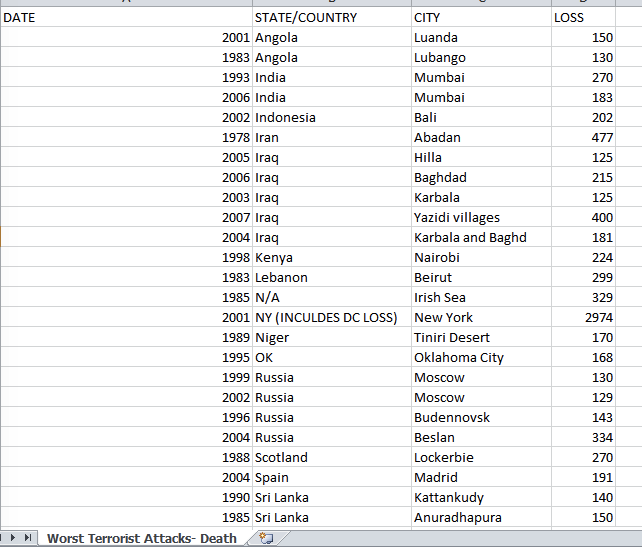 how can i do this I need to show the Date and the how the deaths increased
please help
Thanks
↧
Send data from a java application to processing for display
Hello All,
I would like to send a constant stream of data/objects from a java application to processing for rendering/display. The java application could be running remotely, say in AWS, and so this is a networking question.
Does any have any good examples or pointers?
Thanks.
↧
↧
How can you lay a video on top of another?
I need it so that it looks like their blended. I'm trying to lay a video on top of a live webcam video, so you will see the contents of the video happening over yourself. Please help. I know I've kinda asked this before but no one's answering me and i still haven't figured it out haha
↧
How to display coordinates of all the particles in Arraylist
Hi there,
I'm quite new here and try to find a solution to a certain problem I have. Unfortunately, I have little experience in Processing. I'm using Plethora to create swarm like simulation. I have an Arraylist to create all the agents of the swarm. Each particle in my Arraylist is moving in a 3D box.
I want to have text lines on my screen that display the current location of every agent , X,Y,Z. like - Agent1 X location: , Y location: , Z location: -Agent2 X location:... and so on
What should I do?
↧
Minim pause() does not work
Hi,
I am working on a tangible music player with Arduino and for this I am using the minim library. However, the player.pause() function does not work in my code. It only stops the song for a few milliseconds and then continues to play the song.
The code for the pause function is as the following:
    boolean state = false;

    if (keyPressed) {
        if (key == 'p' && !state) {
          state = true;
          player[currentSong].pause();
        }
        else if (key == 'p' && state) {
        state = false;
        player[currentSong].play();
      }
Is there something else that I have to add in order to let it pause until I press the P key again?
↧