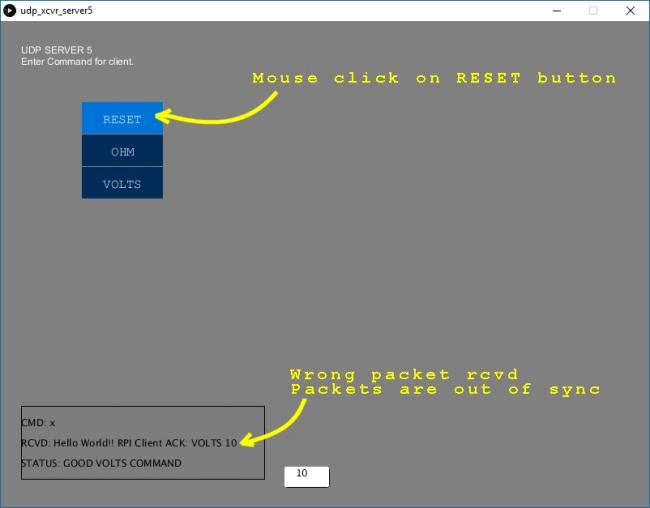
I'm still learning how to make GUI screens and this is my first attempt to add buttons together with mouse events. I've mostly used a command line style interfaces in the past over the serial port or network. This time I wanted to have a button send the command line in text over the network. So I started using the CP5 library and the mouse events function. But when I try this, something appears to be out of sync. This is a project using the RPI as an instrument to collect data.
But when I add the additional CP5 library and the mouse event function, in 'udp_server5', the packet messages are received out of sync. I don't get the correct packet when I click on any of the buttons. They seem to be out of sync by one or two messages. I would get the correct packet after a couple of mouse clicks. I use the console to print debug messages so I can follow the state of the program. I added some screenshots below to show what happens. The 'udp_server5' code is also show below.
I use the same python code on the RPI for either udp server code on the PC. I already worked out the udp network communications with my RPI with the previous code show below in 'udp_server4'. There, I just use a command line to send a text command over the network. My RPI is running python to decode the command, then acknowledge the command back to the server, along with a packet sequence# so I can know if I'm getting the correct packet. At the moment, I only decode 3 commands.
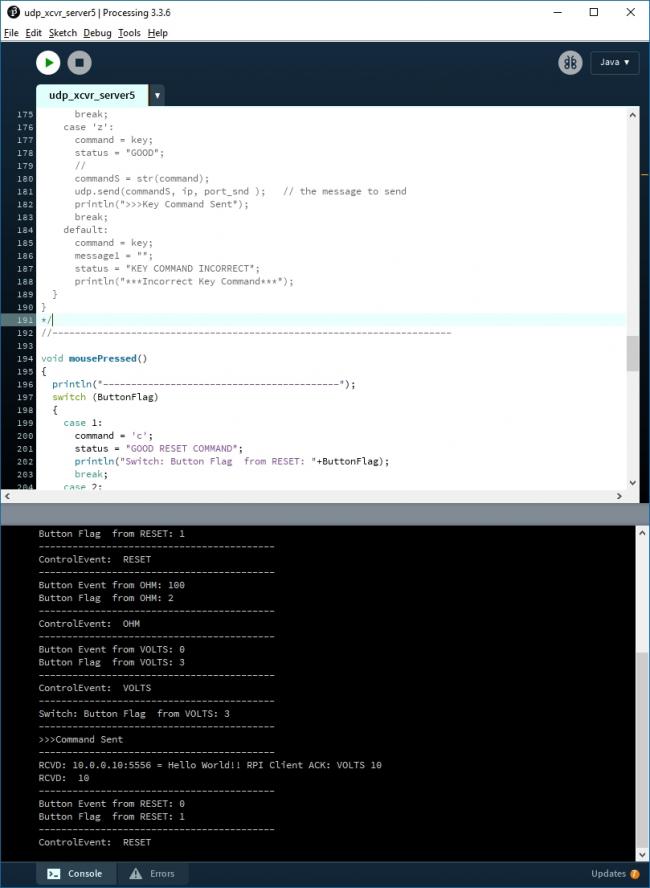
In the udp_server5 code, I use a button flag to keep track of which button I click on. From looking at the debug messages in the console, I see the button events occur last. I was expecting them to occur first when I click on any button. So the button flag doesn't get updated with the current value. And so the wrong command is sent over the network. When I click on the same button again, the button flag is finally updated with the correct value, so then the right command is sent over the network.
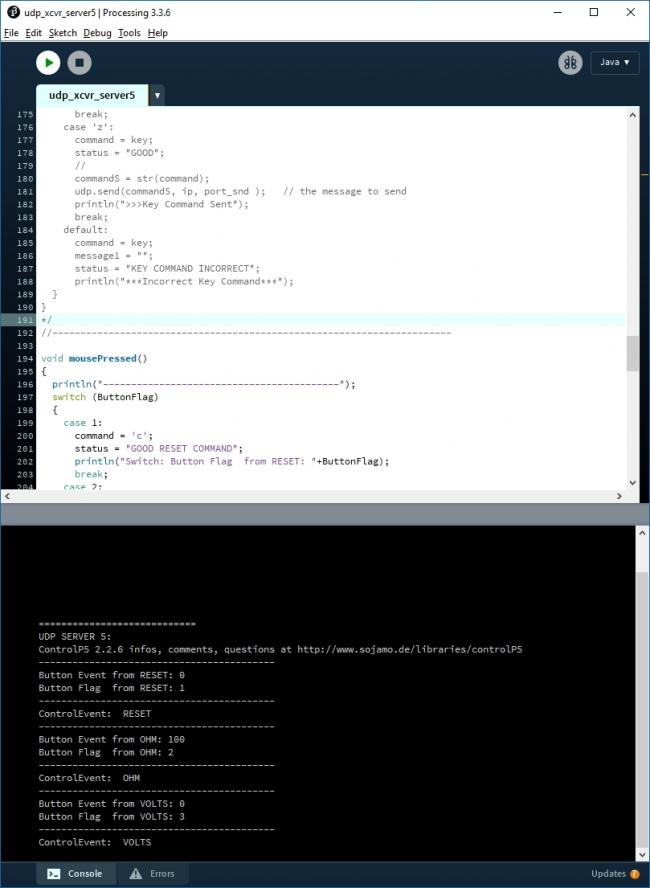
Another item I don't understand from looking at the debug messages. When I start the program I see Control Events already in my console from the 3 buttons I created without clicking on anything. so this also causes my Button Flag to begin with the wrong value.
I'm currently using Processing ver3.3.6. And I used the CP5 library examples from Processing to add the buttons to my code in 'udp server 5'. And I found the mouse event function on the reference page and in the examples. But I'm not sure if these steps are combined in the correct order.
Could I be using the wrong coding technique ?
Here's the code for 'udp_server4'
//=====================================================
//UDP Server 4
//press any key to send a command message from the Server to RPI client
//The RPI client will reply back to the Server
//Send:    Server PC  (10.0.0.3)  to RPI Client(10.0.0.10)
//Receive: RPI Client (10.0.0.10) to Server PC (10.0.0.3)
//ControlP5 Library Buttons
//-----------------------------------------------------------------------------------
// import UDP library
import hypermedia.net.*;
// import Button library
//import controlP5.*;
//
UDP udp;  //define the UDP object
//ControlP5 cp5;
//
//-----------------------------------------------------------------------------------
//
int myColor = color(255);
int c1,c2;
int c = 0;
int indent = 25;
int ButtonFlag;
float n,n1;
//
String message1 = "";
String message2 = "00000";
String status = "";
char command;
//
//--------------------------------------------------------------------------------
void setup()
{
  //create a new datagram connection
  //From Client to Server=5555
  //From Server to Client=5556
  //
  int UDP_port_rcv = 5555;
  int UDP_port_snd = 5556;
  //
  smooth();
  size(800, 600);
  background(128);
  //
  fill(255);  // Set fill to white
  noStroke();
  rect(350, 550, 55, 25, 5);
  //
  text("UDP SERVER 4\nEnter Command for client. ", indent, 40);
  //
  println("============================");
  println("UDP SERVER 4: ");
  //noStroke();
  //
  //--------------------------------------------------------------------------------
  // load a new font. ControlFont is a wrapper for processing's PFont
  PFont pfont = createFont("Courier",20,true); // use true/false for smooth/no-smooth
  //ControlFont font = new ControlFont(pfont,20); //font size for Text Field
  //
  //-----------------------------------
  udp = new UDP( this, UDP_port_rcv );
  //
  //printout the connection activity
  //udp.log( true );
  //
  // wait for incoming message
  udp.listen( true );
}

//--------------------------------------------------------------------------------
//process events
//keep draw() here to continue looping
void draw()
{
  //background(128);
  //clear text area for packet message
  fill(125);  // Set fill to gray
  stroke(1);
  rect(25,475,300,90);
  //
  //clear area for packet sequence#
  fill(255);  // Set fill to white
  noStroke();
  rect(350, 550, 55, 25, 5);
  //
  //display packet message
  fill(0);  // Set fill to black
  text("CMD: " + command,indent,500);
  text("RCVD: " + message1,indent,525);
  text("STATUS: " + status,indent,550);
  //
  //display packet sequence#
  fill(0);  // Set fill to black
  text(message2, 360, 550, 55, 55);
  //
}

//--------------------------------------------------------------------------------
//On key pressed event:
//send the command to the client
void keyPressed()
{
  String ip       = "10.0.0.10"; // the Client IP address
  int port_snd    = 5556;        // Sent Port
  String commandS;
  switch (key)
  {
    case 'c':
      command = key;
      status = "GOOD";
      //
      commandS = str(command);
      udp.send(commandS, ip, port_snd );   // the message to send
      println(">>>Key Command Sent");
      break;
    case 'x':
      command = key;
      status = "GOOD";
      //
      commandS = str(command);
      udp.send(commandS, ip, port_snd );   // the message to send
      println(">>>Key Command Sent");
      break;
    case 'z':
      command = key;
      status = "GOOD";
      //
      commandS = str(command);
      udp.send(commandS, ip, port_snd );   // the message to send
      println(">>>Key Command Sent");
      break;
    default:
      command = key;
      message1 = "";
      status = "KEY COMMAND INCORRECT";
      println("***Incorrect Key Command***");
  }
}

//--------------------------------------------------------------------------------
//Extended handler
//In the Extended Handker,
//The two arguments representing in order,
//the sender IP address and the sender port
public void receive( byte[] data, String ip, int port )
{
  // get the "real" message =
  // forget the ";\n" at the end <-- !!! only for a communication with Pd !!!
  //data = subset(data, 0, data.length-2);

  //String message = new String( data );
  message1 = new String(data);
  //Extract Packet Sequence#
  message2 = new String(message1.substring(35,message1.length()));

  //print the result
  println( "RCVD: "+ip+":"+port+" = "+""+message1);
  //print packet sequence#
  println( "RCVD: "+message2);
  //
}

//=============================================================
Here's the code for 'udp_server5'
//=====================================================
//UDP Server 5
//click mouse to send a command message from the Server to RPI client
//Send:    Server PC  (10.0.0.3)  to RPI Client(10.0.0.10)
//Receive: RPI Client (10.0.0.10) to Server PC (10.0.0.3)
//ControlP5 Library Buttons
//-----------------------------------------------------------------------------------
// import UDP library
import hypermedia.net.*;
// import Button library
import controlP5.*;
//
UDP udp;  //define the UDP object
ControlP5 cp5;
//
//-----------------------------------------------------------------------------------
//
int myColor = color(255);
int c1,c2;
int c = 0;
int indent = 25;
int ButtonFlag;
float n,n1;
//
String message1 = "";
String message2 = "00000";
String status = "";
char command = ' ';
//
String ip       = "10.0.0.10"; // the Client IP address
int port_snd    = 5556;        // Sent Port
byte[] data;
//
//--------------------------------------------------------------------------------
void setup()
{
  //create a new datagram connection
  //From Client to Server=5555
  //From Server to Client=5556
  //
  int UDP_port_rcv = 5555;
  int UDP_port_snd = 5556;
  //
  smooth();
  size(800, 600);
  background(128);
  //
  fill(255);  // Set fill to white
  rect(350, 550, 55, 25, 5);
  //
  text("UDP SERVER 5\nEnter Command for client. ", indent, 40);
  //
  println("============================");
  println("UDP SERVER 5: ");
  //noStroke();
  //
  //--------------------------------------------------------------------------------
  // load a new font. ControlFont is a wrapper for processing's PFont
  PFont pfont = createFont("Courier",20,true); // use true/false for smooth/no-smooth
  ControlFont font = new ControlFont(pfont,20); //font size for Text Field
  //
  cp5 = new ControlP5(this);
  cp5.enableShortcuts();
  frameRate(50);
  //
  // create a new button
  cp5.addButton("RESET")
     .setValue(0)
     .setPosition(100,100)
     .setSize(100,39)
     .setId(2);
     ;
  // create a new button
  cp5.addButton("OHM")
     .setValue(100)
     .setPosition(100,140)
     .setSize(100,39)
     .setId(2);
     ;
  // create a new button
  cp5.addButton("VOLTS")
     .setPosition(100,180)
     .setSize(100,39)
     .setValue(0)
     .setId(2);
     ;
  //--------------------------------------------------------------------------------
  // change the font and content of the captionlabels
  // for both buttons create earlier.
  cp5.getController("RESET")
     .getCaptionLabel()
     .setFont(font)
     .toUpperCase(false)
     .setSize(16)
     ;
  //
  cp5.getController("OHM")
     .getCaptionLabel()
     .setFont(font)
     .toUpperCase(false)
     .setSize(16)
     ;
  //
  cp5.getController("VOLTS")
     .getCaptionLabel()
     .setFont(font)
     .toUpperCase(false)
     .setSize(16)
     ;
  //-----------------------------------
  udp = new UDP( this, UDP_port_rcv );
  //
  //printout the connection activity
  //udp.log( true );
  //
  // and wait for incoming message
  udp.listen( true );
}

//--------------------------------------------------------------------------------
//process events
// keep draw() here to continue looping
void draw()
{
  //background(128);
  //clear text area for packet message
  fill(125);  // Set fill to gray
  stroke(1);
  rect(25,475,300,90);
  //
  //clear number area for packet sequence#
  fill(255);  // Set fill to white
  noStroke();
  rect(350, 550, 55, 25, 5);
  //
  //display packet message
  fill(0);  // Set fill to black
  text("CMD: " + command,indent,500);
  text("RCVD: " + message1,indent,525);
  text("STATUS: " + status,indent,550);
  //
  //display packet sequence#
  fill(0);  // Set fill to black
  text(message2, 360, 550, 55, 55);
  //
}

//--------------------------------------------------------------------------------
//On key pressed event:
//send the command to the client

void keyPressed()
{
  String ip       = "10.0.0.10"; // the Client IP address
  int port_snd    = 5556;        // Sent Port
  String commandS;
  println("------------------------------------------");
  switch (key)
  {
    case 'c':
      command = key;
      status = "GOOD";
      //
      commandS = str(command);
      udp.send(commandS, ip, port_snd );   // the message to send
      println(">>>Key Command Sent");
      break;
    case 'x':
      command = key;
      status = "GOOD";
      //
      commandS = str(command);
      udp.send(commandS, ip, port_snd );   // the message to send
      println(">>>Key Command Sent");
      break;
    case 'z':
      command = key;
      status = "GOOD";
      //
      commandS = str(command);
      udp.send(commandS, ip, port_snd );   // the message to send
      println(">>>Key Command Sent");
      break;
    default:
      command = key;
      message1 = "";
      status = "KEY COMMAND INCORRECT";
      println("***Incorrect Key Command***");
  }
}

//-----------------------------------------------------------------------

void mousePressed()
{
  println("------------------------------------------");
  switch (ButtonFlag)
  {
    case 1:
      command = 'c';
      status = "GOOD RESET COMMAND";
      println("Switch: Button Flag  from RESET: "+ButtonFlag);
      break;
    case 2:
      command = 'z';
      message1 = "";
      status = "GOOD OHM COMMAND";
      println("Switch: Button Flag  from OHM: "+ButtonFlag);
      break;
    case 3:
      command = 'x';
      message1 = "";
      status = "GOOD VOLTS COMMAND";
      println("Switch: Button Flag  from VOLTS: "+ButtonFlag);
      break;
  }
  sendcmd();
}

//--------------------------------------------------------------------------------
//Transmit Command
public void sendcmd()
{
  //String ip       = "10.0.0.10"; // the Client IP address
  //int port_snd    = 5556;        // Sent Port
  //
  println("------------------------------------------");
  String commandS = str(command);
      udp.send(commandS, ip, port_snd );   // the message to send
      println(">>>Command Sent");
}

//--------------------------------------------------------------------------------
// Extended handler
//In the Extended Handker,
//The two arguments representing in order,
//the sender IP address and the sender port
public void receive( byte[] data, String ip, int port )
{
  //String message = new String( data );
  println("------------------------------------------");
  message1 = new String(data);
  message2 = new String(message1.substring(35,message1.length()));

  //print the result
  //println( "receive: \""+message+"\" from "+ip+" on port "+port );
  println( "RCVD: "+ip+":"+port+" = "+""+message1);
  println( "RCVD: "+message2);
  //
}
//-----------------------------------------------------------------------
public void controlEvent(ControlEvent theEvent) {
  println("------------------------------------------");
  println("ControlEvent: ",theEvent.getController().getName());
  n = 0;
}

//-----------------------------------------------------------------------
// function RESET will receive changes from
// controller with name COLORA
public void RESET(int theValue) {
  println("------------------------------------------");
  println("Button Event from RESET: "+theValue);
  ButtonFlag = 1;
  println("Button Flag  from RESET: "+ButtonFlag);
}

//-----------------------------------------------------------------------
// function OHM will receive changes from
// controller with name COLORB
public void OHM(int theValue) {
  println("------------------------------------------");
  println("Button Event from OHM: "+theValue);
  ButtonFlag = 2;
  println("Button Flag  from OHM: "+ButtonFlag);
}

//-----------------------------------------------------------------------
// function VOLTS will receive changes from
// controller with name COLORC
public void VOLTS(int theValue) {
  println("------------------------------------------");
  println("Button Event from VOLTS: "+theValue);
  ButtonFlag = 3;
  println("Button Flag  from VOLTS: "+ButtonFlag);
}

//====================================================
Here's a screenshot from the console in when starting 'udp_server5'
Here's a screenshot from the console when I click on the RESET button in 'udp_server5'
Here's a screenshot from the gui screen when I click on the RESET button in 'udp_server5'