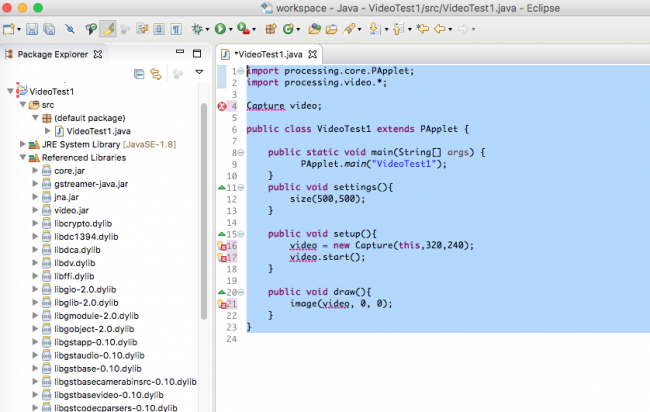
I want to develop a Java project using Eclipse that utilizes some Processing graphics elements and in particular video capture. The two Processing tutorials related to using video and using the Eclipse IDE are quite helpful but.. the problem appears to be how to import the video library into Eclipse. I've added the video library to my Processing 3.3 app and the simple example works correctly (and so do a number of other more complex codes using the Capture object and the Processing IDE). I've also successfully used Eclipse to write a number of codes that use the Processing .core jars (extend PApplet) and appear to have the Processing core correctly imported and the build paths set. I imported the .jar files from the added "video" libraries folder of the Processing,app as well as the ldylib files (based upon a recommendation in the Forum:
https://forum.processing.org/two/discussion/10034/#Comment_39007
Eclipse appears to recognize the presence of "processing.video.*" - see Eclipse "output" below but it doesn't recognize the presence of the Capture class in the library??
Suggestions from anyone who has used video capture (i.e. camera image capture on a Mac) would be appreciated.
`import processing.core.PApplet;
  import processing.video.*;

  Capture video;

   public class VideoTest1 extends PApplet {

public static void main(String[] args) {
      PApplet.main("VideoTest1");
}
public void settings(){
    size(500,500);
}

public void setup(){
    video = new Capture(this,320,240);
    video.start();
}

public void draw(){
    image(video, 0, 0);
}
} ` The error is associated with the Capture object.