Hello guys! Need some help!
I am trying to use save frame to take a screenshot of a plot I have currently programmed with processing. The plot GUI has several Buttons (made with Cp5) and Toggles. I have set a function which is being called when a button is pressed. However, sometime the frame I take comes with the cp5 buttons GUI but sometimes doesn't. So some frames have the buttons but some don't. For example:
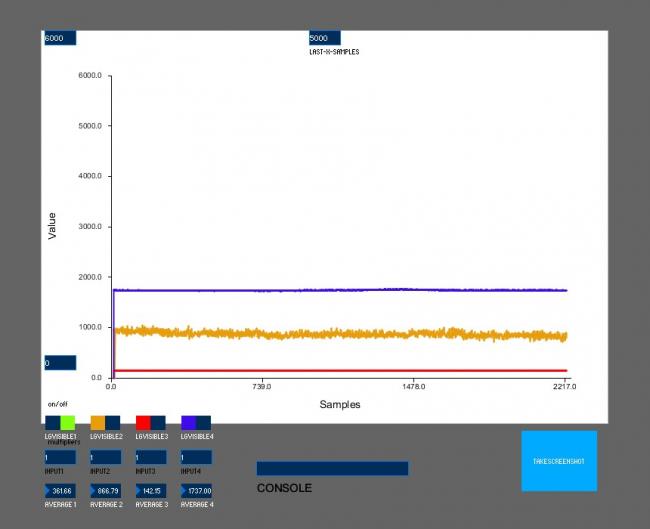
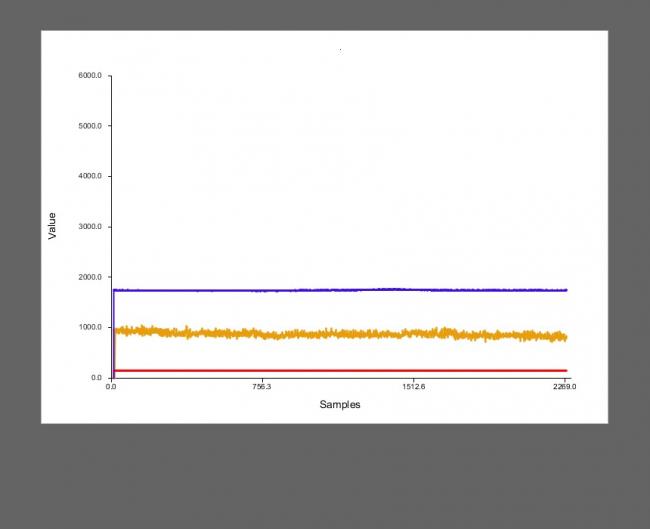
Hope, you can see the frames. The code I use for the button is:
Button b1 = cp5.addButton("takeScreenShot").setPosition(z, w).setSize(100, 80);

  b1.addCallback(new CallbackListener() {
    public void controlEvent(CallbackEvent theEvent) {
      switch(theEvent.getAction()) {
        case(ControlP5.ACTION_PRESSED):
        if (flag) {
          println("Taking photo...");
          takeScreenShot();
        }
        break;
         case(ControlP5.ACTION_RELEASED):
         println("Done");
         flag = true;
         break;
      }
    }
  }
  );
and the function called for the takeFrame():
void takeScreenShot() {
      String photoDate = new SimpleDateFormat("yyyy_MM_dd-HH_mm_ss").format(new Date());
      String Date = new SimpleDateFormat("yyyy_MM_dd").format(new Date());
      int m = millis()/1000; //for seconds
      saveFrame("C:/Users/. . . .. . ./data/"+ Date + "/photos/" +  "/manual/"+ photoDate + String.valueOf(m)+ ".jpg");
    }
Is there any suggestions on how to tackle this problem?? I would appreciate any help, and any clarifications if needed.
ps. If the photos don't show, the buttons from cp5 configurations sometimes show sometimes don't. Can't find any reason why.!