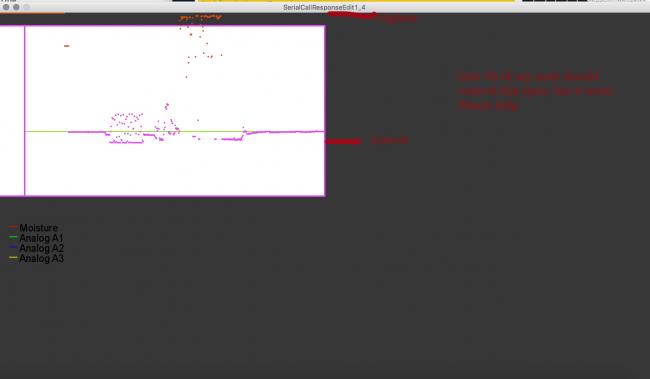
Noobie here, I'm trying to take an input from an arduino over a usb and plot onto a graph. Everything is fine except I cant seem to map where the y begins and ends on my graph. I tried so many things but its stuck between 0 and about 400px. You'll see the box where the graph is suppose to occupy. I can't move/control the y axis. I drew out the issue in red on the attached image, please help!!
You'll see reference to multiple sensors, I am only trying to plot the sensor "moisture" for now.
/This sketch is frankensteined from the SerialCall Response example with arduino and
//this guy's sketch(code in description of video) - http://pastebin.com/kSrU3nVH
import processing.serial.*;
int moisture; //the only sensor I'm currently trying to plot
float inByte;
int second; //sensors that ar![]()e not yet plotted but printed in the Console
int third; // " "
int fourth; // " "
Serial myPort; // The serial port
int[] serialInArray = new int[4]; // Where we'll put what we receive
int serialCount = 0; // A count of how many bytes we receive
PFont g_font;
boolean firstContact = false; // Whether we've heard from the microcontroller
int[] yValues;
int w;
//SETUP
void setup() {
size(1280, 720); // Stage size
g_font = loadFont("ArialMT-20.vlw");
textFont(g_font, 20);
w = 640; //width of our plot
strokeWeight(1);
smooth(); // or noSmooth();
yValues = new int[w];
println(Serial.list());
String portName = Serial.list()[1];
myPort = new Serial(this, portName, 9600);
}
void draw() {
String inString = myPort.readStringUntil('\n');
if (inString != null) {
inString = trim(inString);
inByte = float(inString);
moisture = int(map(inByte, 0, 255, 360, 25));
//setting the boundry for the graph line, inside box EXCEPT IT DOESNT WORK
}
//This should be down here, but works inside the if statement.
//moisture = int(map(inByte, 0, 255, 360, 25));
//Background and box for graph
background(55);
rect(25, 25, 615, 335);
fill(255);
//LEGEND
strokeWeight(1.5);
stroke(255, 0, 0);
line(20, 420, 35, 420);
stroke(0, 255, 0);
line(20, 440, 35, 440);
stroke(0, 0, 255);
line(20, 460, 35, 460);
stroke(255, 255, 0);
line(20, 480, 35, 480);
fill(0, 0, 0);
text("Moisture", 40, 430);
text("Analog A1", 40, 450);
text("Analog A2", 40, 470);
text("Analog A3", 40, 490);
//ACTUAL PLOTTED LINE
for (int i = 1; i < w; i++) {
yValues[i-1] = yValues[i];
}
yValues[w-1] = moisture;
//}
stroke(120, 200, 0);
line(w, moisture, 0, moisture);
strokeWeight(3);
//This controls the horizontal "TICKER LINE"
for (int i=1; i<w; i++) {
//stroke (rgb)
stroke(220, 75, yValues[i]);
//point folar x, float y
point(i, yValues[i]);
rect(0, 25, 50, 335);
fill(255);
}
}
void serialEvent(Serial myPort) {
// read a byte from the serial port:
int inByte = myPort.read();
if (firstContact == false) {
if (inByte == 'A') {
myPort.clear(); // clear the serial port buffer
firstContact = true; // you've had first contact from the microcontroller
myPort.write('A'); // ask for more
}
} else {
// Add the latest byte from the serial port to array:
serialInArray[serialCount] = inByte;
serialCount++;
// If we have 3 bytes:
if (serialCount > 3) {
moisture = serialInArray[0];
second = serialInArray[1];
third = serialInArray[2];
fourth = serialInArray[3];
// print the values (for debugging purposes only):
println(moisture + "\t" + second + "\t" + third + "\t" + fourth);
// Send a capital A to request new sensor readings:
myPort.write('A');
// Reset serialCount:
serialCount = 0;
}
}
}
/*ARDUINO UNO CODE
int firstSensor = 0; // first analog sensor
int secondSensor = 0; // second analog sensor
int thirdSensor = 0; // digital sensor
int fourthSensor = 0; //turning this into a fluxuating value
int inByte = 0; // incoming serial byte
void setup()
{
// start serial port at 9600 bps:
Serial.begin(9600);
pinMode(2, INPUT); // digital sensor is on digital pin 2
establishContact(); // send a byte to establish contact until receiver responds
}
void loop()
{
// if we get a valid byte, read analog ins:
if (Serial.available() > 0) {
// get incoming byte:
inByte = Serial.read();
// read first analog input, divide by 4 to make the range 0-255:
firstSensor = analogRead(A0);
// delay 10ms to let the ADC recover:
delay(10);
// read second analog input, divide by 4 to make the range 0-255:
secondSensor = analogRead(A1) / 4;
// read switch, map it to 0 or 255L
thirdSensor = map(digitalRead(A2), 0, 1, 0, 255);
// send sensor values:
fourthSensor = analogRead(A3) / 4; //new sensor I added
Serial.write(firstSensor);
Serial.write(secondSensor);
Serial.write(thirdSensor);
Serial.write(fourthSensor);
}
}
void establishContact() {
while (Serial.available() <= 0) {
Serial.print('A'); // send a capital A
delay(300);
}
}
*/